12 min read
A giveaway winner announcement should tell people who won, what they won, and what happens next. The wording also needs to match the stage you have reached: drawing an entry is different from confirming that the person is eligible and has accepted the prize.
Use these templates for Instagram, Facebook, TikTok, and YouTube, plus private messages, email, reminders, and replacement announcements. Replace the bracketed text with your details before posting, and retain any required campaign disclosures. These messages accompany your giveaway rules; they do not replace them.
1. Simple Giveaway Winner Announcement
Use when: You have checked eligibility, the winner has accepted, and you have agreed how to identify them publicly. This version works as an Instagram caption, Facebook post, or update on the original giveaway.
The [GIVEAWAY_NAME] result is here!
Congratulations to [WINNER_DISPLAY], our confirmed winner of [PRIZE].
[SELECTION_SUMMARY]
We’ll arrange prize delivery privately through [OFFICIAL_CONTACT]. Thank you to everyone who entered and joined the conversation.
For this giveaway, updates will come only from [OFFICIAL_ACCOUNT_OR_CHANNEL]. We will not ask for a payment, password, or login code to claim the prize.
If you have only drawn an entry and still need a reply or eligibility check, start with the private notification templates below.
Choose a Template for Your Situation
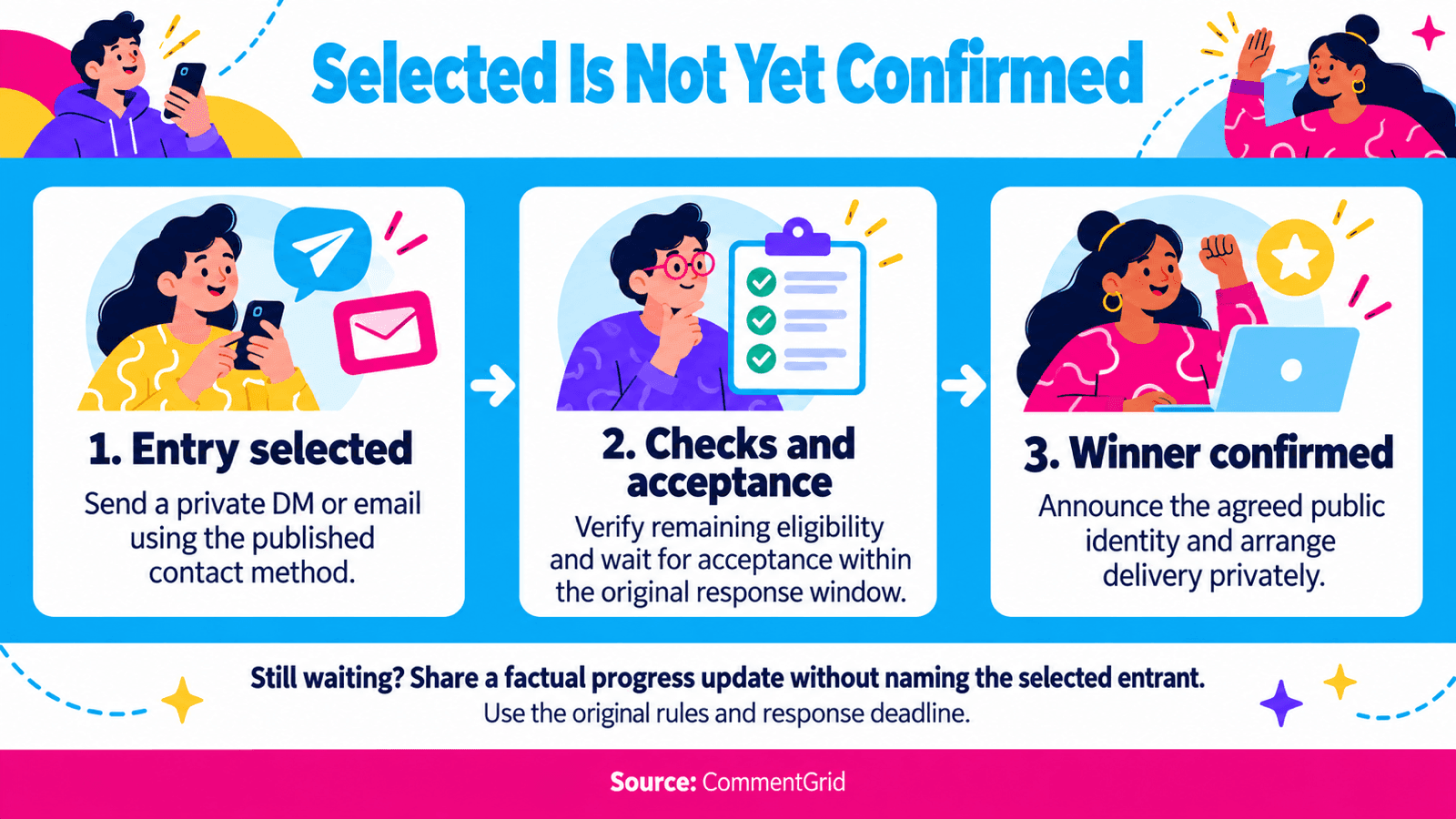
| Situation | Templates |
|---|---|
| A confirmed winner, ready to announce | 1–4: General post, Instagram Story, TikTok video, YouTube comment |
| Several confirmed winners with different prizes | 5: Multiple winners |
| A selected entrant who needs to respond | 6–7: DM or email |
| Eligibility and acceptance confirmed | 8: Private delivery next steps |
| Waiting for a reply or final confirmation | 9–10: Private reminder or public progress update |
| An alternate or a new draw under your rules | 11–12: Separate replacement announcements |
| A confirmed result without a public name | 13: Anonymous announcement |
Fill In These Details Once
Keep the same details in your post, Story, email, and private messages.
| Placeholder | What to Enter |
|---|---|
[GIVEAWAY_NAME] | The campaign name people recognize from the original post |
[WINNER_DISPLAY] | The agreed public handle, name, or other identifier |
[PRIZE] | The actual prize and relevant variation, such as size or package |
[SELECTION_SUMMARY] | A sentence describing the method you actually used |
[OFFICIAL_CONTACT] | The specific account, email, or contact route used for this giveaway |
[RESPONSE_DEADLINE_WITH_TIMEZONE] | The deadline calculated from your published response window, written with a date, time, and timezone |
[RULES_LOCATION] | A direct rules URL or a clear location, such as the original giveaway caption |
For the deadline, use a format such as October 8, 2026, at 18:00 UTC. This is an example, not a suggested claim window. Do not replace your original rules with a generic “48 hours” copied from a template.
For a random draw, a selection summary could read: “Selected at random from the eligible entries in our final draw list.” For a judged contest, describe the published judging criteria instead. Remove any sentence about a recording, result link, or entry count unless you have that information.
Platform-Specific Winner Announcement Templates
2. Instagram Story Winner Announcement
Use when: The winner is confirmed and you want a short visual announcement. Pair the Story with an update on the original giveaway post so entrants know where to find the result later.
Frame 1 [GIVEAWAY_NAME] — winner confirmed!
Frame 2 Congratulations, [WINNER_DISPLAY]. You’ve won [PRIZE]!
Frame 3 Thank you for entering. The result and delivery contact details are in [RESULT_LOCATION]. Our giveaway account is [OFFICIAL_ACCOUNT]. No payment is needed to claim.
Make [RESULT_LOCATION] specific, such as “the updated giveaway caption.” Use a handle mention only if you have agreed to identify the winner that way.
3. TikTok Winner Announcement Video Script
Use when: The winner is confirmed and you are recording a short follow-up video.
“The [GIVEAWAY_NAME] giveaway has a confirmed winner: [WINNER_DISPLAY]!
You’ve won [PRIZE]. [SELECTION_SUMMARY]
We’re arranging the prize through [OFFICIAL_CONTACT]. Thanks to everyone who took part. You can find the result details in [RESULT_LOCATION].”
Suggested on-screen text:
Winner: [WINNER_DISPLAY] Prize: [PRIZE] Official account: [OFFICIAL_ACCOUNT] No payment to claim
Only say that a draw is shown in the video if you include the actual recording. You can thank participants without promising another giveaway you have not scheduled.
4. YouTube Winner Announcement Comment
Use when: The winner is confirmed and you want the result attached to the original giveaway video. Pin the comment if that option is available to your channel.
GIVEAWAY RESULT — [GIVEAWAY_NAME]
Congratulations to [WINNER_DISPLAY], the confirmed winner of [PRIZE]. [SELECTION_SUMMARY]
We have confirmed acceptance and will arrange delivery through [OFFICIAL_CONTACT], the contact route listed in [RULES_LOCATION].
Thank you to everyone who entered. Giveaway updates will come from [OFFICIAL_CHANNEL]. We will not ask for a payment, password, or login code to release the prize.
Use a real contact route instead of an unexplained “check your DMs.” If the winner has not yet responded, use the progress update in template 10. YouTube requires contests and prize awards to follow the published Official Rules; the announcement should reflect that existing process. See YouTube’s contest guidelines.
5. Multiple Winners With Different Prizes
Use when: Everyone listed has been verified and accepted. Match each person to their actual prize.
The [GIVEAWAY_NAME] winners are confirmed:
• [WINNER_1_DISPLAY] — [PRIZE_1] • [WINNER_2_DISPLAY] — [PRIZE_2] • [WINNER_3_DISPLAY] — [PRIZE_3]
[SELECTION_SUMMARY]
We’ll arrange delivery with each winner privately through [OFFICIAL_CONTACT]. Thanks to everyone who participated.
These are the confirmed results. Official updates are available from [OFFICIAL_ACCOUNT_OR_CHANNEL]; no payment is required to claim a prize.
Delete unused rows or add more. If everyone receives the same prize, say that explicitly. If only some winners are confirmed, identify the confirmed prizes and give a separate status for the others rather than implying the entire giveaway is complete.
Private Winner Notification Templates
6. Initial Winner DM: Selected, Pending Verification
Use when: You have drawn an entry but still need the entrant’s response or a remaining eligibility check. Send this from the official account through the contact method in your rules.
Hi [NAME_OR_HANDLE], this is [HOST_NAME] from [OFFICIAL_ACCOUNT]. Your entry was selected in [GIVEAWAY_NAME] for [PRIZE].
Before we confirm the winner, please reply by [RESPONSE_DEADLINE_WITH_TIMEZONE] to let us know whether you would like to accept. We also need to confirm [REMAINING_PUBLISHED_ELIGIBILITY_CHECK].
You can check this giveaway and our contact details at [ORIGINAL_POST_OR_RULES_LOCATION]. We will not ask you to pay or share your password or login codes.
Once the checks are complete, we’ll confirm the result and explain the delivery arrangements privately.
Remove the eligibility-check sentence if no check remains. Ask only about requirements already included in the giveaway rules. Save shipping details for the delivery stage.
7. Giveaway Winner Notification Email
Use when: Email is part of the published contact process and you have an address the entrant provided for that purpose. A public comment export does not give you a verified email address for the commenter.
Subject: Your Entry Was Selected: [GIVEAWAY_NAME]
Hi [NAME],
Your entry in [GIVEAWAY_NAME] was selected for [PRIZE].
Please reply to this email by [RESPONSE_DEADLINE_WITH_TIMEZONE] to confirm whether you would like to accept. Before we confirm the award, we need to complete [REMAINING_PUBLISHED_ELIGIBILITY_CHECK].
You can verify the campaign and this contact address at [ORIGINAL_POST_OR_RULES_LOCATION]. There is no payment required to claim the prize, and we will not ask for passwords or login codes.
We’ll send the next steps once eligibility and acceptance are confirmed.
[HOST_NAME] [BRAND] [OFFICIAL_CONTACT]
If eligibility has already been verified, replace the check sentence with “Your eligibility has been confirmed.” Keep acceptance and delivery status accurate.
8. Winner Confirmation and Delivery Next Steps
Use when: The entrant has accepted and all necessary eligibility checks are complete.
Hi [NAME], thank you for confirming. You are the confirmed winner of [PRIZE] in [GIVEAWAY_NAME]!
To arrange delivery, please send [REQUIRED_DELIVERY_DETAILS] through [PRIVATE_FULFILLMENT_CHANNEL]. Please keep those details out of public comments.
We’ll send your next delivery update by [UPDATE_DATE_WITH_TIMEZONE]. No payment is required to receive the prize.
For the public announcement, we propose using [PROPOSED_PUBLIC_IDENTIFIER]. Please let us know if you have a concern before we post it.
Thank you for taking part, [HOST_NAME]
Request only the details needed for this prize. A digital prize and a shipped package may need different information. Keep any public identification consistent with the giveaway’s existing rules and privacy arrangements; a request for a promotional photo should be separate from prize delivery.
Follow-Up and Replacement Templates
9. Private Reminder Before the Response Deadline
Use when: The original response window is still open and you have already sent the initial notification.
Hi [NAME], a reminder about your selected entry in [GIVEAWAY_NAME] for [PRIZE].
We contacted you on [FIRST_CONTACT_DATE]. The response deadline remains [RESPONSE_DEADLINE_WITH_TIMEZONE], as stated in [RULES_LOCATION]. Please reply through [ORIGINAL_CONTACT_METHOD] if you would like to accept and complete the remaining steps.
After that deadline, we’ll follow the unclaimed-prize procedure in the published rules. If you’ve already replied, thank you—we’ll check the conversation before taking any further action.
[HOST_NAME] · [OFFICIAL_CONTACT]
Do not restart or shorten the claim window accidentally when sending a reminder. Check the original thread for a reply before treating the deadline as missed.
10. Public Update While Confirmation Is Pending
Use when: You owe entrants an update, but eligibility or acceptance is not yet confirmed. This version keeps the selected entrant unnamed.
Update on [GIVEAWAY_NAME]: entries are closed, and we’re completing the winner confirmation process for [PRIZE].
[CURRENT_STATUS]
We’ll post the next update by [NEXT_UPDATE_DATE_WITH_TIMEZONE] here on [OFFICIAL_ACCOUNT_OR_CHANNEL]. The original rules and response window still apply.
Thank you for your patience. We will not ask anyone to pay to claim a prize.
For [CURRENT_STATUS], use a factual sentence such as “We have contacted the selected entrant and are waiting for a response within the published claim window.” If that is not what happened, describe the actual stage. A revised update time is not a revised entry or response deadline.
11. Announcing a Confirmed Alternate Winner
Use when: Your rules provide for ordered alternates, you are following that order, and the replacement has been verified and accepted.
Result update for [GIVEAWAY_NAME]: the prize was not claimed within the response window ending [ORIGINAL_DEADLINE_WITH_TIMEZONE].
Following the alternate-winner procedure in [RULES_LOCATION], we contacted the next eligible alternate from the original draw. [NEW_WINNER_DISPLAY] has now been confirmed as the winner of [PRIZE].
This follows the original alternate order; no new draw took place. We’ll arrange delivery privately through [OFFICIAL_CONTACT].
Thank you to everyone who entered.
Use the stated reason only if it is accurate. If the original selection failed an eligibility requirement instead, say that briefly without publishing private details. Do not describe a fresh draw as an alternate promotion.
12. Announcing a Confirmed Winner After a Redraw
Use when: Your published rules provide for a new draw in this situation, it has taken place, and the new winner is verified and has accepted.
Updated result: [GIVEAWAY_NAME]
[BRIEF_FACTUAL_REASON_FOR_REPLACEMENT]. Under the replacement procedure in [RULES_LOCATION], we held a new random draw on [REDRAW_DATE_WITH_TIMEZONE] from the remaining eligible entries.
Congratulations to [NEW_WINNER_DISPLAY], the confirmed winner of [PRIZE]. We’ll arrange delivery through [OFFICIAL_CONTACT].
This update replaces our earlier result for this prize. Thank you for your patience while we completed the process.
Keep the original result and the reason for replacement in your internal records. Do not redraw because you prefer another entrant, or invent a forfeiture deadline after someone has been selected.
13. Winner Announcement Without a Public Name
Use when: The winner is confirmed and your rules and privacy arrangements allow an announcement without their name or handle.
[GIVEAWAY_NAME] is complete. The winner of [PRIZE] has been verified, has accepted, and has been contacted about delivery.
We’re keeping the winner’s identity private in this announcement. [SELECTION_SUMMARY]
Thank you to everyone who participated. Questions about this giveaway can be sent to [OFFICIAL_CONTACT]. We will not ask anyone to pay to claim a prize.
This communicates a confirmed result without publishing contact details or inventing a name. Keep the private winner record even when the public update is anonymous.
Make the Announcement Match the Draw
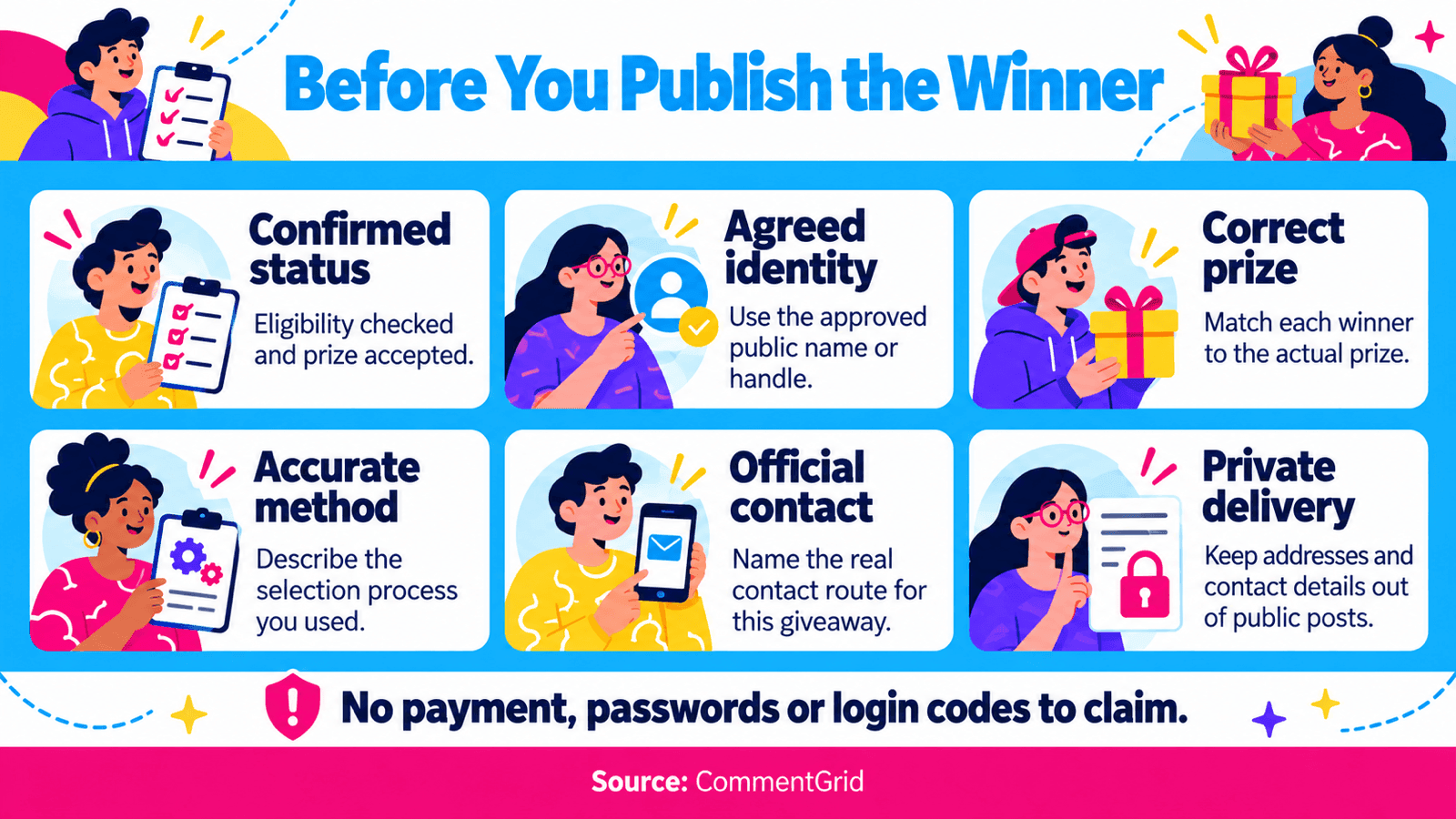
Before posting, compare the announcement with your saved result. Check the account or profile behind the winning entry, the prize, the draw method, and the claim status. A similar display name or an incoming “I won” message is not enough to establish that the sender made the winning entry.
If you publish numbers, distinguish comments collected, eligible entries, and unique participants. They may differ when replies or multiple entries are involved. Do not call 500 eligible comments “500 people” unless you have checked that they represent 500 different participants.
Add a draw-record link or recording only if you have one that accurately represents the process. Review public attachments for addresses, email conversations, and other information that belongs in the private record. A screenshot can document a result without proving that every eligible entry was collected or every rule was checked.
Naming the official contact route also helps entrants recognize impersonators. The FTC’s prize-scam guidance identifies demands for payment to collect a prize as a scam warning. Keep the contact instructions consistent across the original post, announcement, and private messages.
Use CommentGrid Before You Announce
If you still need to select a winner, start with the picker for your campaign: Instagram Giveaway Picker, Facebook Giveaway Picker, or YouTube Giveaway Picker.
Review the available entries, apply the rules you published, run the draw, and keep the result. Check requirements that cannot be established from the comments separately. For an Instagram walkthrough, see how to pick a giveaway winner from comments.
Then choose the notification template that matches the result’s actual status. You send and publish the messages through your own official channels.
Frequently Asked Questions
How Soon Should I Announce a Giveaway Winner?
Follow the announcement schedule in your rules. If verification or acceptance is still pending, publish a factual progress update rather than presenting an unconfirmed entrant as the final winner.
How Long Should a Winner Have to Respond?
Use the response window stated before the giveaway began, including how it is measured. Calculate the deadline and include its date, time, and timezone in the notification. These templates do not create a new deadline for an existing giveaway.
What If I Never Specified an Unclaimed-Prize Procedure?
Do not assume a template’s deadline gives you permission to cancel a selection. Review the original terms and resolve the missing procedure before announcing a forfeiture or replacement.
Should I Post a Winner’s Address or Delivery Screenshot?
Keep delivery addresses and contact details private. If you share a packing photo or delivery update, remove labels, tracking details, and private messages from the image, and agree on any use of the winner’s photo or name beforehand.
Prepare Your Giveaway Result Before You Announce It
Use CommentGrid’s Giveaway Picker to review available comment entries, apply your giveaway rules, and select winners before preparing your announcement.
Explore the Giveaway Picker M
MMarshall Sun
Building CommentGrid to decode social conversations. Exploring the signal within the noise of the global social web.