16 min read
Instagram shows who follows an account, but it does not provide a simple button for turning a public profile's follower list into a spreadsheet.
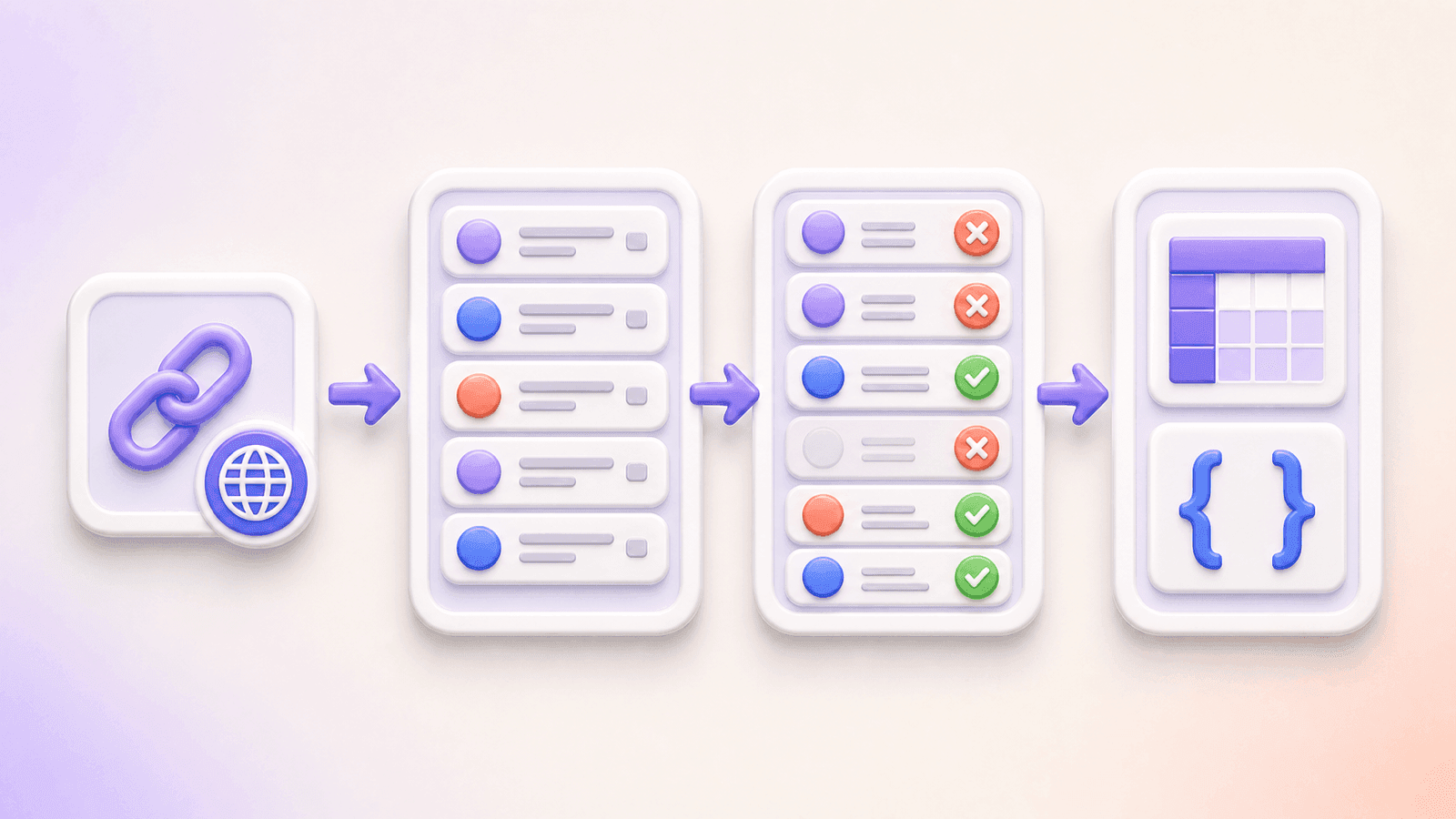
The quickest way to create a structured list is to use an Instagram follower exporter:
- Copy the URL of a public Instagram profile.
- Paste it into the CommentGrid Instagram Follower Exporter.
- Start the export and review the available follower rows.
- Remove duplicate usernames or unwanted entries.
- Download the cleaned list as CSV or JSON.
You can start the export without signing in to Instagram, sharing an Instagram password, or installing a browser extension.
Can You Export Instagram Followers?
There are two main ways to export Instagram follower information, depending on what you need.
Export information from your own Instagram account
Meta provides an official process for downloading information associated with your account through Accounts Center.
According to Instagram's official information export instructions, you can create an export, select the profile and information you need, and download it to your device when it is ready. Meta notes that preparing an export may take up to 30 days.
This method is suitable when you need an official archive of your own Instagram information.
Export available followers from a specific public profile
If you need a clean list from a public Instagram profile, ready for further processing, a follower exporter is the more direct route.
Instead of requesting a complete account archive, you provide the public profile URL and export the follower data available at that time.
This is useful for:
- Audience research
- Creator or account reviews
- Campaign reporting
- Spreadsheet analysis
- Duplicate detection
- Offline records
- Structured data workflows
How to Export Instagram Followers with CommentGrid
Step 1: Copy the Instagram Profile URL
Open the public Instagram profile whose followers you want to export.
Copy the profile URL from your browser. A valid profile link normally looks like:
https://www.instagram.com/username/
Make sure the URL points to a profile rather than an individual post, Reel, Story, search result, or hashtag page.
The profile must be public. CommentGrid cannot access follower lists from private Instagram accounts.
Step 2: Open the Instagram Follower Exporter
Go to the CommentGrid Instagram Follower Exporter.
Paste the public Instagram profile URL into the input field and start the export.
The web tool does not require:
- Your Instagram username
- Your Instagram password
- A connected Meta account
- An API key
- A Chrome extension
This is different from tools that ask you to log in through an unofficial app or give an extension access to your active Instagram session.
Step 3: Wait for the Available Followers to Load
CommentGrid will collect the follower data that Instagram makes available for the public profile at the time of the request.
Depending on the size of the account and current platform conditions, the export may take a few minutes.
Do not close the page while the task is still in progress. When the export finishes, the available follower rows will appear in a structured table.
Step 4: Review the Follower List
Inspect the results before downloading them.
The export includes the usernames returned from the public Instagram profile. Additional public profile fields may be present when Instagram makes them available.
Because available fields can vary, do not assume that every follower row will contain a full name, biography, profile image, verification status, or other optional information.
During your review, look for:
- Duplicate usernames
- Empty or incomplete rows
- Unavailable accounts
- Irrelevant entries
- Obvious collection errors
- Usernames that should be excluded from your analysis
If the data will be used for formal research or campaign reporting, keep an unchanged copy of the original export before cleaning it.
Step 5: Remove Duplicate Usernames
CommentGrid lets you remove duplicate usernames before downloading the final list.
Duplicates can make an audience appear larger than the usable dataset actually is and can distort calculations such as:
- Unique follower counts
- Sample sizes
- Audience overlap
- Giveaway eligibility
- Account comparisons
- Manual classification totals
Deduplicate using the username as the primary identifier. Display names are not reliable unique identifiers because multiple people can use the same name and users can change their display names.
Step 6: Download as CSV or JSON
After reviewing and cleaning the list, choose the export format that best fits your workflow.
Download CSV when you want to:
- Open the list in Excel
- Import it into Google Sheets
- Sort and filter followers
- Add manual classifications
- Create pivot tables
- Compare two follower snapshots
- Share the list with a non-technical team
Download JSON when you want to:
- Process the data with a script
- Import it into a database
- Build an internal analysis workflow
- Use structured data in an application
- Preserve the returned fields programmatically
- Connect the dataset to an automation
A CSV file can be opened in Microsoft Excel, Google Sheets, Apple Numbers, Airtable, and most spreadsheet applications.
What Data Is Included in the Export?
The core field is the follower username returned from the public Instagram profile.
Additional public profile information may be included when it is available in the data returned by Instagram. The exact columns can therefore differ between exports.
A result may contain fields such as:
- Instagram username
- Other available public profile information
- Source or collection-related fields generated for the export
The tool does not reveal private contact details, private profile content, passwords, direct messages, or information that is not available through the public profile data returned during the request.
Before building a report, check the actual column names and completion rate in your export rather than assuming every field is populated.
CSV vs. JSON: Which Format Should You Choose?
| Format | Best for | Main advantage |
|---|---|---|
| CSV | Excel, Google Sheets, reporting and manual review | Easy to open, filter and share |
| JSON | Scripts, databases, applications and automation | Preserves structured fields and data types |
| Both | Teams combining manual analysis with technical workflows | Provides a spreadsheet copy and a machine-readable backup |
Choose CSV if you mainly want to inspect followers or create a report. Choose JSON if the file will be processed by software.
If you are unsure, download the CSV version first. It is the easiest format for most audience-analysis tasks.
What Can You Do with an Exported Follower List?
1. Create an Audience Research Dataset
A follower count tells you the size of an audience, but it does not give you a reviewable list of the accounts behind that number.
Exporting the available followers lets you organize public usernames into a structured dataset. You can then manually classify a sample by criteria relevant to your research, such as:
- Creator
- Brand
- Customer
- Industry professional
- Local business
- Community account
- Unclear
- Potential spam
A follower export alone does not prove someone's age, location, occupation, purchase behavior, or personal interests. Only assign categories that can be reasonably supported by the public information you have reviewed.
2. Review a Potential Creator Partnership
Brands evaluating an influencer can use an available follower sample as one input in a broader creator review.
Questions you might investigate include:
- Does the visible audience appear relevant to the campaign?
- Are there repeated or suspicious-looking usernames?
- Do followers appear to include real creators, customers, or businesses?
- Is the audience broadly aligned with the advertised niche?
- How much of the list can be meaningfully classified?
Do not treat a follower export as definitive proof of audience quality. Private accounts, incomplete public data, platform limits, and changes over time can affect what is available.
Combine follower-list observations with:
- Instagram Insights supplied by the creator
- Post and Reel engagement
- Comment quality
- Audience demographics
- Previous campaign results
- Reach and impression data
3. Prepare Campaign Reports
An exported follower list can create a dated account snapshot for a campaign.
Record:
- Profile URL
- Displayed follower count
- Export date and time
- Number of available rows exported
- Number of duplicate usernames removed
- Final number of unique rows
- Known limitations
This is more transparent than labeling the number of exported rows as the account's total follower count.
4. Compare Follower Snapshots
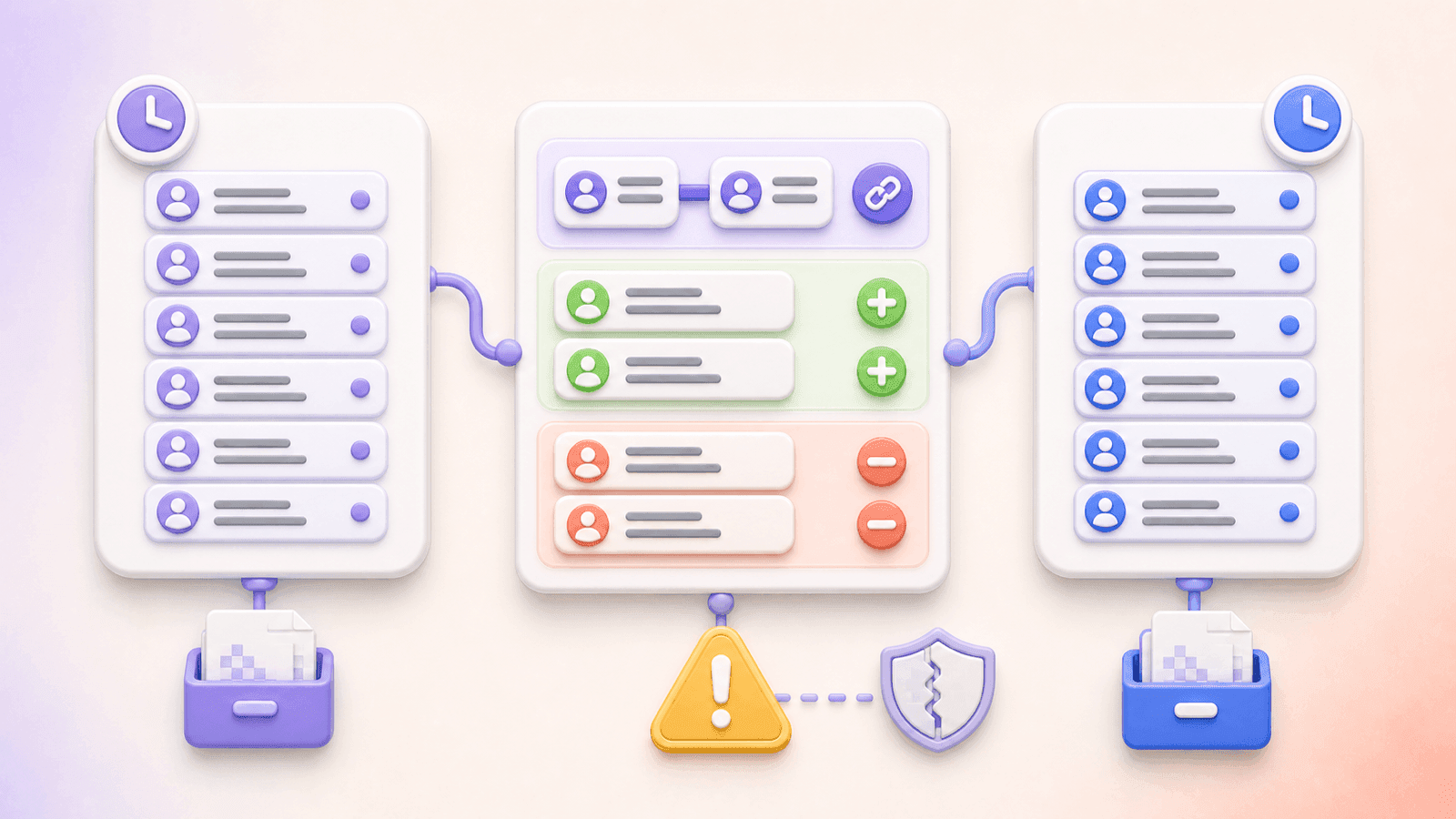
Run exports on two different dates and compare the cleaned username columns.
This can help identify usernames that:
- Appear in both snapshots
- Appear only in the newer snapshot
- Appear only in the older snapshot
However, an incomplete export can produce false additions or removals. Only interpret changes after checking whether both exports were collected under comparable conditions.
A follower exporter is not the same as a real-time follower tracker. Each export is a snapshot of the data available during that request.
5. Clean an Account List
If you already maintain a creator, customer, ambassador, or community database, a follower export can help with list maintenance.
For example, you can compare exported usernames against:
- Campaign participant lists
- Ambassador databases
- Customer-submitted handles
- Event registrations
- Giveaway entries
- Previous follower snapshots
Matching usernames does not grant permission to contact someone. Use the comparison only for an appropriate, lawful purpose.
6. Select a Random Follower
The tool interface may provide a random follower selection workflow from the available exported list.
Before using follower status as a giveaway requirement, make sure your official rules clearly state:
- Which account participants must follow
- When follower status will be checked
- Whether private accounts are eligible
- How duplicate or unavailable accounts will be handled
- How the final winner will be verified
A randomly selected row should be treated as a provisional result until eligibility has been confirmed.
How to Analyze Instagram Followers in Excel or Google Sheets
Preserve the Original Export
Keep the original CSV unchanged and create a separate worksheet for cleaning and analysis.
Name the files with the profile and collection date, for example:
instagram_username_followers_2026-08-17.csv
This makes it clear that the file represents a dated snapshot.
Remove Blank Rows
Filter the username column and remove rows without a usable username.
Document the number of removed rows if the cleaned total will appear in a report.
Check for Duplicates
In Google Sheets or recent versions of Excel, use:
=COUNTIF($A:$A,A2)
If the result is greater than 1, the username appears more than once in column A.
You can also use the spreadsheet's built-in duplicate-removal feature. Always work on a copy so that you retain the original data.
Normalize Usernames
Before comparing lists:
- Convert usernames to lowercase.
- Remove accidental spaces.
- Remove a leading
@if some rows include it and others do not. - Keep one consistent format.
Instagram usernames are not case-sensitive, so ExampleUser and exampleuser should normally be treated as the same username.
Add Review Columns
Useful columns for manual research include:
| Column | Purpose |
|---|---|
| Category | Groups the account by an evidence-based type |
| Reviewed | Shows whether someone inspected the profile |
| Relevant | Marks whether the account fits the research objective |
| Notes | Records limited contextual observations |
| Source profile | Identifies the account whose followers were exported |
| Export date | Records when the snapshot was created |
Avoid adding sensitive assumptions about individuals.
Compare Two Follower Lists
If the older usernames are in column A and the newer usernames are in column B, use this Google Sheets or Excel formula beside the newer list:
=IF(COUNTIF($A:$A,B2)=0,"New in this export","Present before")
Beside the older list, use:
=IF(COUNTIF($B:$B,A2)=0,"Missing from new export","Still present")
These labels describe differences between the two files, not confirmed follows or unfollows. Platform limitations may cause a username to be absent from one export.
Does the Export Include Every Instagram Follower?
Not necessarily.
CommentGrid exports the follower data available from the public profile when the request is made. Instagram may limit how much data can be retrieved, especially for large accounts or during periods of platform restriction.
The exported list may not include every follower because of:
- Instagram availability limits
- Private or inaccessible accounts
- Deactivated or deleted accounts
- Recently changed usernames
- Temporary platform restrictions
- Pagination or retrieval limits
- Changes occurring during the export
The follower count displayed on the profile can therefore be higher than the number of exported rows.
When describing the dataset, use wording such as:
The export contains the follower usernames available from the public Instagram profile at the time of collection.
Avoid stating that you downloaded "all followers" unless you have independently verified the result.
Public and Private Instagram Accounts
CommentGrid is designed for public Instagram profiles.
It cannot export followers from a private account. A private account's displayed name, username, profile image, biography, links, and follower count may still have some public visibility, but its follower list and content are subject to Instagram's access controls.
The exporter does not bypass those controls.
If you own a private account and need your own information, use Instagram's official Accounts Center export instead.
Web Exporter vs. Browser Extension
| Method | Login required | Installation | Best for |
|---|---|---|---|
| CommentGrid web exporter | No Instagram login to get started | No | Exporting available followers from a public profile |
| Instagram Accounts Center | Yes, for your own account | No | Official archive of your own Instagram information |
| Browser extension | Often uses an active Instagram session | Yes | Workflows that require in-page access |
| Manual copying | Usually | No | Very small lists |
| Custom automation | Depends on implementation | Technical setup required | Approved, specialized data workflows |
Be careful with any extension or application that asks for an Instagram password or broad access to an active account session. A follower CSV is not worth exposing account credentials to an untrusted service.
Privacy and Responsible Use
A public username is still information associated with a person or organization. Public availability does not automatically make every use appropriate.
When working with follower data:
- Collect only the fields needed for your stated purpose.
- Do not use exported lists for harassment or unwanted mass messaging.
- Avoid inferring sensitive personal characteristics.
- Restrict access to raw files.
- Remove unnecessary identifiers from published research.
- Verify results before making decisions about an individual.
- Set an appropriate data-retention period.
- Follow applicable privacy, research, marketing, and platform requirements.
For large-scale, commercial, or sensitive uses, obtain appropriate legal and privacy guidance.
Common Instagram Follower Export Problems
The Profile URL Is Rejected
Confirm that the link points to an Instagram profile.
Use a format such as:
https://www.instagram.com/username/
Remove tracking parameters or extra text copied with the URL.
No Followers Are Returned
Possible causes include:
- The profile is private
- The username does not exist
- The account was suspended or deactivated
- Instagram is temporarily limiting available data
- The URL is incorrect
- No follower rows are publicly available for that request
Try opening the profile in a private browser window to confirm that it is publicly accessible.
The Export Contains Fewer Rows Than the Follower Count
The profile count and export rows measure different things. The displayed count is Instagram's account-level total, while the export contains the rows available during collection.
Document both numbers separately.
Some Profile Fields Are Missing
The username is the primary export field. Additional profile fields depend on what is returned and may not be available for every row.
A blank optional field does not necessarily mean the export failed.
The CSV Displays Incorrect Characters
Import the file into Excel using UTF-8 encoding. This helps preserve non-Latin usernames and international characters.
The Same Username Appears More Than Once
Use CommentGrid's duplicate-cleaning option or remove duplicates in your spreadsheet. Preserve the original export if you need to document the cleanup.
The Export Takes Longer Than Expected
Larger public profiles may require more processing time. Keep the page open while the export is in progress and avoid starting multiple identical tasks simultaneously.
Frequently Asked Questions
How do I export Instagram followers to CSV?
Copy the URL of a public Instagram profile, paste it into the CommentGrid Instagram Follower Exporter, run the export, review the available follower rows, and download the cleaned list as CSV.
Can I export Instagram followers without logging in?
Yes. CommentGrid lets you start from a public Instagram profile URL without signing in to Instagram or sharing your Instagram credentials.
Do I need a Chrome extension?
No. The Instagram Follower Exporter works directly in a web browser.
Can I export followers from a private Instagram account?
No. The tool only works with public Instagram profiles and does not bypass private-account restrictions.
Can I open the follower export in Excel?
Yes. Download the CSV file and open or import it into Microsoft Excel. The file can also be used with Google Sheets, Numbers, Airtable, and similar spreadsheet tools.
Can I download the followers as JSON?
Yes. JSON is available for scripts, databases, applications, automation, and other structured data workflows.
What information is included?
The export includes follower usernames returned from the public profile. Additional public fields may be included when they are available.
Can I remove duplicate followers?
Yes. You can review the follower rows and remove duplicate usernames before downloading the final list.
Does the tool export every follower?
It exports the follower data available from the public profile at the time of the request. Instagram limits and account availability may prevent every follower from being included.
Can I use the export to identify unfollowers?
You can compare two dated exports, but a missing username is not definitive proof of an unfollow. Incomplete retrieval, account deactivation, username changes, or platform limitations can also create differences.
Is CommentGrid affiliated with Instagram?
No. CommentGrid is an independent tool and is not affiliated with or endorsed by Instagram or Meta.
Export Instagram Followers in Three Steps
You do not need to copy usernames manually or share your Instagram password with an unofficial application.
With the CommentGrid Instagram Follower Exporter, you can:
- Paste the URL of a public Instagram profile.
- Export, review, and clean the available follower list.
- Download the result as CSV or JSON.
The result is a structured, reusable snapshot for audience research, account reviews, reporting, and offline analysis.
 M
MMarshall Sun
Building CommentGrid to decode social conversations. Exploring the signal within the noise of the global social web.