8 min read
You open an Instagram post, tap the comments, and get a blank panel. Or the conversation loads, but the reply you came back to read is missing.
If Instagram comments are not showing, first check whether the problem affects several posts or just one conversation. A blank panel across multiple posts is a reason to test the app and connection. One missing comment calls for a closer look at replies, comment controls, or whether the comment is still available.
Start with the symptom below. You do not need to change every setting to investigate one missing reply.
Identify What Is Missing
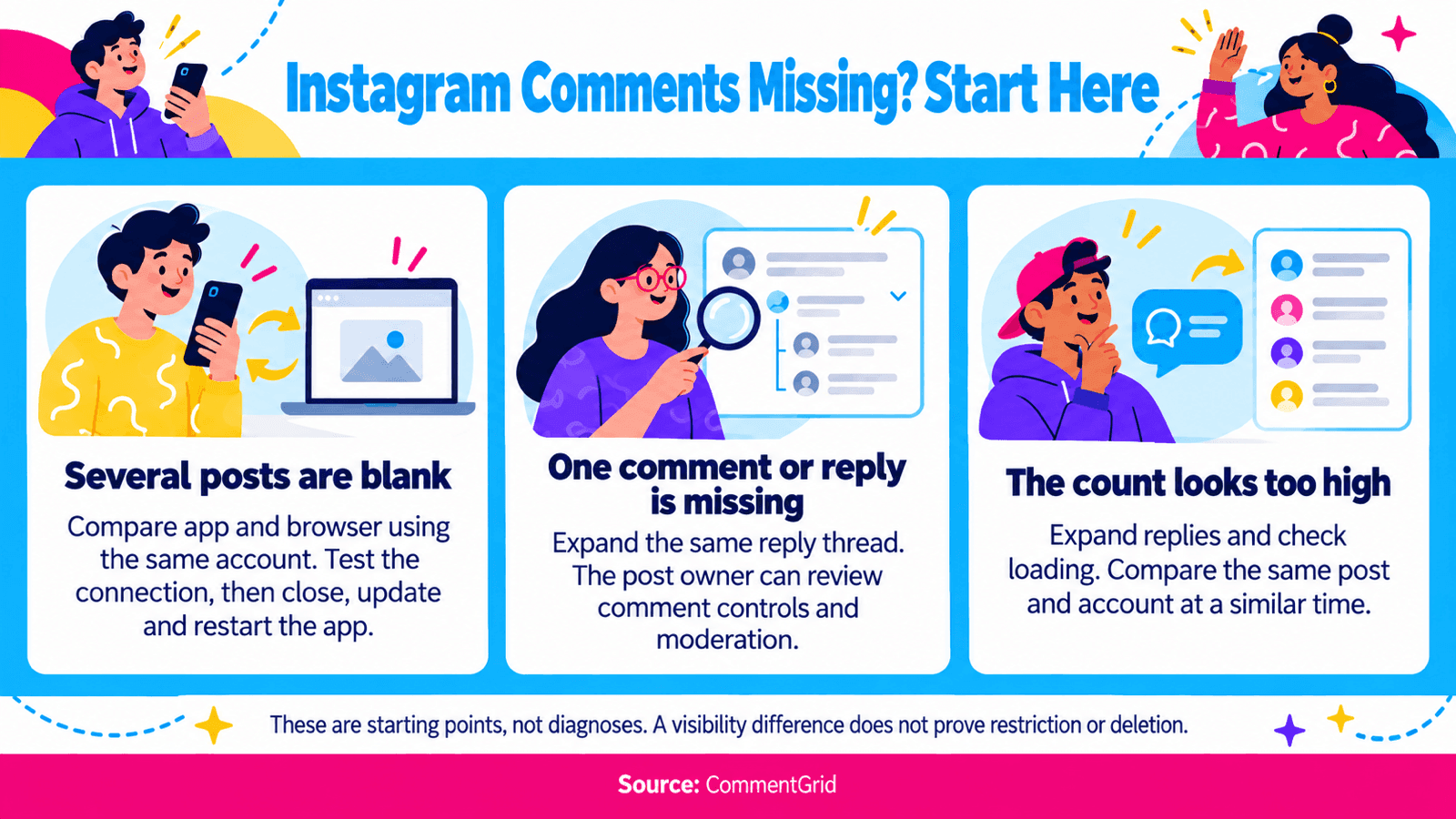
| What You See | What to Check First | Who Can Take Action |
|---|---|---|
| Comments keep loading or stay blank on several posts | App, connection, and browser comparison | Anyone viewing the posts |
| Comments are unavailable on one post | The post's commenting controls | The post owner |
| Most comments appear, but one is missing | Reply threads, filters, restrictions, or removal | The viewer can inspect threads; the owner controls moderation |
| You can see your own comment, but someone else cannot | Whether you are comparing the same thread; owner moderation settings | The commenter can investigate; the owner can review settings |
| A reply count appears, but the replies do not | Expand the relevant thread and check whether it loads | Anyone with access to the conversation |
| The displayed count is higher than the comments you can read | Collapsed threads, loading, and visibility differences | Viewers can inspect; owners can also review moderation |
These are starting points, not diagnoses. A difference between two screens does not by itself prove that someone restricted your account or deleted a comment.
If Instagram Comments Are Not Loading
Use this sequence when the comment panel is blank, freezes, or keeps showing a loading indicator.
1. Compare Another Post and the Browser
Open a different post with comments, then return to the affected one. If only one conversation fails, move to the post-specific checks below.
Next, open the same post URL on Instagram's website while signed in to the same account. Using the same account makes the comparison more useful: switching accounts also changes access and moderation conditions.
If comments load in the browser but not in the app, focus next on the app checks below.
2. Test the Connection
Refresh the post. If it still fails, try switching between Wi-Fi and mobile data, where available, and reopen the same conversation.
If other online apps are also struggling, investigate the connection first. If only Instagram fails across several posts and devices, an Instagram-side problem is another possibility. That pattern alone does not confirm an outage.
3. Close, Update, and Restart
Close Instagram completely and reopen it. Check the App Store or Google Play for an Instagram update, then restart your phone if the problem continues.
These are standard app troubleshooting steps supported by Apple's iPhone and iPad guidance and Google's Android guidance. Test the same post after each step so you know whether anything changed.
4. Try Device-Specific Cleanup
On Android: Look in your phone's settings for Instagram's app information, then its storage options. If available, try Clear cache. Menu names vary by device. Clearing cache removes temporary files; Clear storage or Clear data is a different action that can erase locally stored app data. Google's Pixel troubleshooting guide explains that distinction.
On iPhone or iPad: If closing, updating, and restarting have not helped, Apple's guidance includes deleting and reinstalling the app. Save anything stored only in the app and make sure you can sign back in before doing this; deleting an app can remove local data.
These steps address a malfunctioning app. They cannot restore a comment that is unavailable because of moderation or deletion.
If Comments Are Missing on Your Own Post
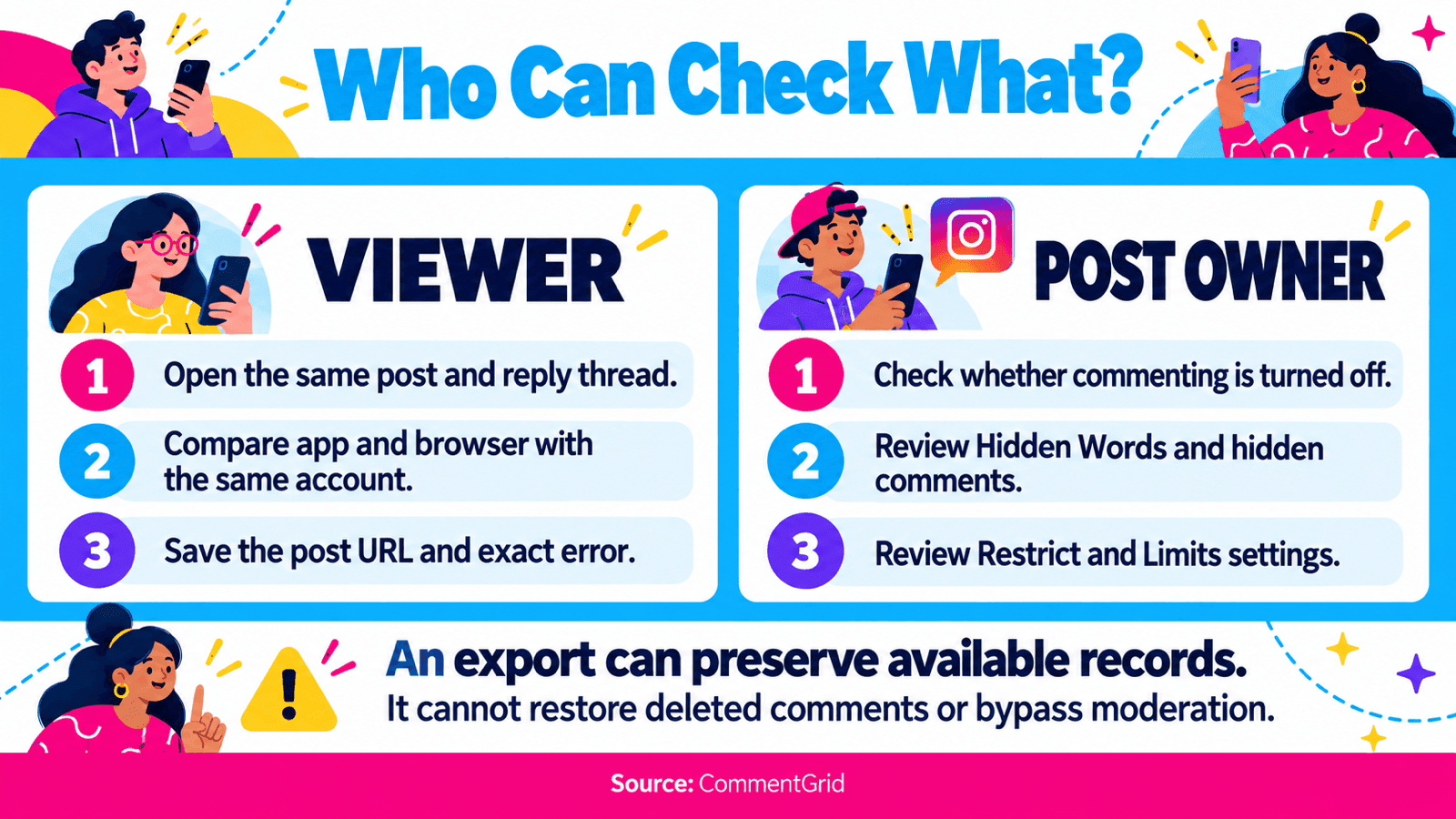
When other conversations work normally, check the controls for the affected post and your account. Instagram's menu labels can vary, so look for the named setting rather than relying on one fixed menu path.
Check Whether Commenting Is Turned Off
Open your post or Reel and inspect its options menu. If Turn On Commenting appears, select it if you want to allow comments again, then reopen the thread.
Instagram allows owners to switch off comments for individual posts. A viewer cannot change that setting on someone else's content. Meta describes these post-level comment controls alongside its moderation tools.
Review Hidden Words
Find Hidden Words in your account settings and review the filtering options and custom word list. A broad custom term may match a legitimate comment you expected to see.
Meta explains that Hidden Words can filter comments containing selected words, phrases, emojis, and spam content. Its 2026 overview of Instagram safety tools also describes different levels of comment filtering.
If Instagram offers a hidden-comments section for the post, inspect it. Review the relevant comment or filter before deciding what to change. You do not need to turn off all filtering to investigate one match.
Review Restricted Accounts and Limits
Restrict affects a particular account. Meta explains that a restricted person's new comments on your posts are initially visible to that person; you can choose to view and approve, delete, or ignore them. Check your restricted accounts if one person's comments seem to be missing. See Meta's explanation of Restrict.
Limits, also described as Limit Interactions, applies to selected groups. Review who is covered by an active limit, especially if you recently enabled it during a surge of activity. Meta's description of Limits explains how it can hide comments from non-followers or recent followers.
Check these settings on the account that owns the post. Changing Hidden Words on your own profile does not control how another creator moderates their comments.
If Your Comment Is Not Showing for Other People
First, confirm that you and the other viewer opened the same post and expanded the same reply thread. A reply underneath another comment can be easy to overlook.
If you can still see your comment and another viewer cannot, restriction or filtering is one possible explanation. It is not enough evidence to conclude that the owner restricted you. The owner would need to review their moderation controls to establish that.
If Instagram shows an error when you submit a comment, save the exact wording. That is a posting problem, which needs a different investigation from a comment that was published and later became unavailable.
Check Account Status in your settings for any relevant notice, and follow any review option Instagram provides. Meta describes Account Status as a place to understand enforcement and restrictions in its update on account transparency. A missing comment alone does not establish an account-wide penalty, and an empty status screen does not explain every loading or visibility issue.
If a comment has been deleted or removed, refreshing the app will not bring it back. A notification or screenshot can show what was visible earlier, but it does not guarantee the comment is still available in the live thread.
If Instagram Replies Are Not Showing
Open the parent comment and use the reply-expansion control beneath it, if one appears. Continue expanding the thread where Instagram offers more replies.
If expansion stalls, test that same thread in the browser. If the parent comment is visible but a particular reply remains unavailable, consider the same filtering, restriction, and removal possibilities as for other comments.
Treat a reply count as a reason to inspect the thread. It does not establish that every reply can currently be loaded by your account.
Why the Comment Count May Not Match What You See
The number attached to a post and the comments you have actually opened are different things to compare. Before treating the gap as missing data:
- Expand the available reply threads.
- Check whether the conversation is still loading.
- If you own the post, review its moderation settings and any hidden-comments view offered.
- Make comparisons on the same post, with the same account, as close together in time as possible.
The gap alone cannot tell you how many comments were deleted, which accounts were restricted, or whether an export failed. Record what you can actually see rather than assigning a cause from the count.
When to Report the Problem to Instagram
If the issue persists after the relevant checks, look for Help → Report a Problem in Instagram's settings. Include enough detail to reproduce it:
- The affected post or Reel URL.
- Whether one post or several posts are affected.
- Your device, operating system, and Instagram app version.
- A screenshot of the blank panel or exact error message.
- When it happened, including your timezone, and whether the same account could load the comments in a browser.
Use Instagram's technical problem reporting page for its reporting instructions. For a specific account enforcement notice, use the review route attached to that notice when available. Neither route comes with a guaranteed response or recovery time.
When a Comment Export Can Help
If the comments are available but difficult to review in a long thread, an export gives you a file to inspect and keep. The Instagram comment viewing guide explains this workflow for supported public posts and Reels.
With CommentGrid, you can download available comment data as CSV, XLSX, or JSON. In the verified Instagram XLSX format, Comment Text contains the text, Username identifies its author, and Is This a Reply and Parent Comment ID help you inspect replies in context. Search and filtering happen in your spreadsheet or data viewer after download.
An export is a record of the data returned for that request. It cannot restore deleted comments, override the owner's moderation settings, or guarantee access to every comment represented by Instagram's displayed count. If no data is returned, check the URL and the tool's error message before drawing conclusions about the post.
Frequently Asked Questions
Why Can I See My Instagram Comment but My Friend Cannot?
You may be viewing different parts of the thread, or moderation may affect visibility. Expand the same reply chain first. Restrict can produce this pattern, but a single comparison does not prove it was used.
Does Clearing the Cache Bring Back Deleted Comments?
No. Clearing cache may help an Android app load properly. It does not reverse deletion or change the post owner's moderation settings.
Why Are Comments Missing on an Instagram Reel?
Start with the same checks as for a post: test another conversation, compare the app and browser, expand replies, and review comment controls if you own the Reel.
Can CommentGrid Reveal Hidden Instagram Comments?
CommentGrid works with available data from supported public content. It is not a way to bypass Hidden Words, account restrictions, or private access. Use Instagram's own moderation controls to review hidden comments on posts you manage.
Review Available Instagram Comments in a Spreadsheet
Need to work through a long public conversation? Export the available comments from a supported post or Reel, then review the downloaded file in Excel or Google Sheets.
Open Instagram Comment Extractor M
MMarshall Sun
Building CommentGrid to decode social conversations. Exploring the signal within the noise of the global social web.