9 min read
TikTok comments are getting more ways to answer back. The September 3, 2026 update introduced 60-second voice replies, comment polls, photo carousels and Live Photo comments, with a mixture of immediate availability and gradual rollout. ABC News
For viewers, the immediate questions are practical: how do you comment with a picture, where is the microphone, and why does somebody else have a feature you can't see? For creators, there's a bigger question: which of these formats will produce a conversation worth having?
This guide covers both. Douyin's earlier experience with voice comments also offers useful context: making it easier to speak doesn't automatically make a comment section easier to follow.
What changed in TikTok comments?
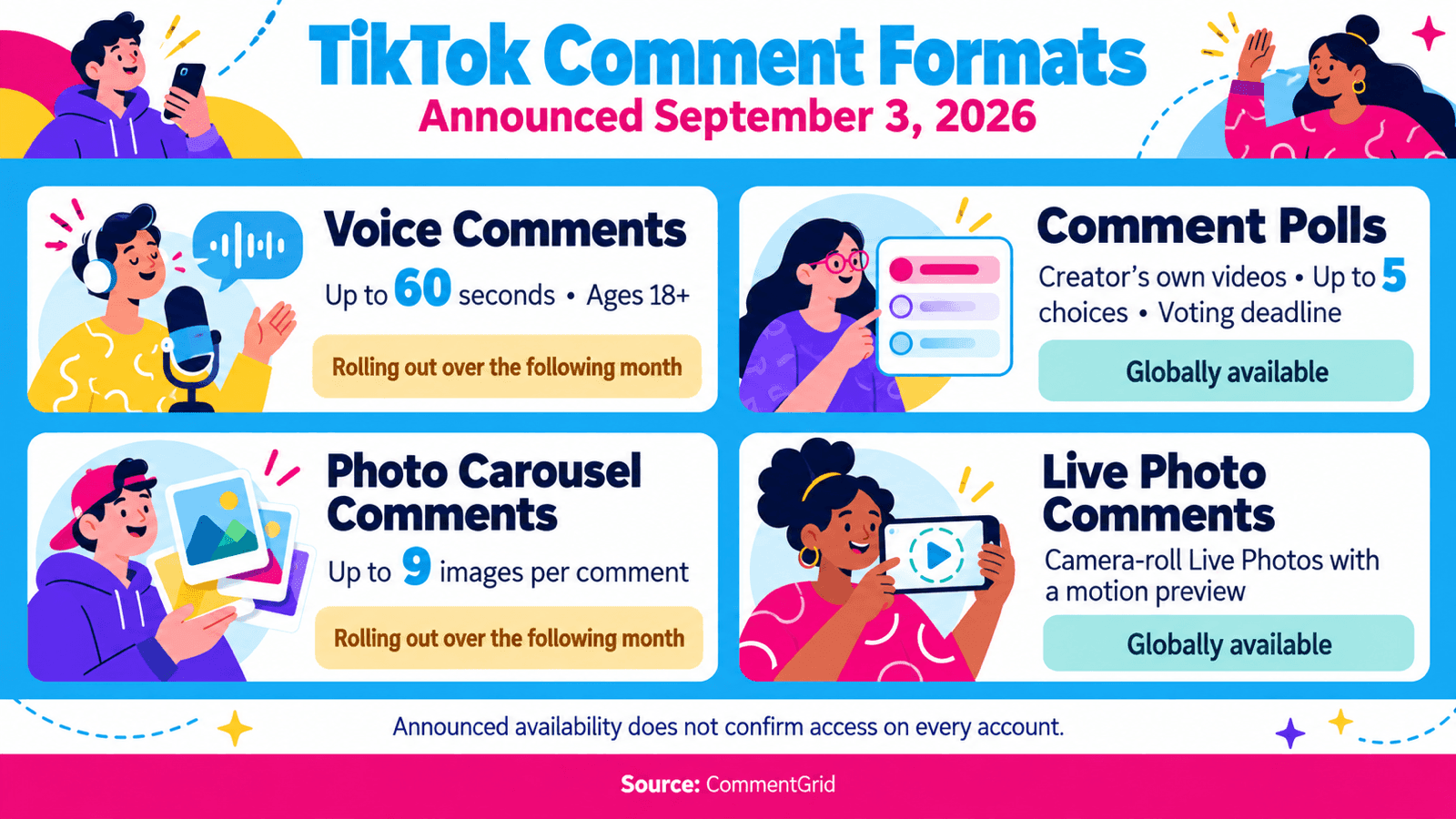
| Feature | What it supports | Availability announced September 3 |
|---|---|---|
| Voice Comments | Audio replies up to 60 seconds; accounts aged 18+ | Global rollout over the following month |
| Comment Polls | Creators poll viewers under their own videos; up to five choices and a voting deadline | Globally available |
| Photo Carousel Comments | Up to nine images in one comment | Global rollout over the following month |
| Live Photo Comments | Camera-roll Live Photos with a short motion preview | Globally available |
Photo comments already existed. The photo changes expand that feature rather than introduce picture replies for the first time. TikTok's official announcement
How to comment pictures on TikTok
To add a photo to a TikTok comment:
- Open the post and tap Comments.
- Tap Add comment.
- Choose Upload photo, if available, and select an image from your device.
- Allow the necessary photo access when prompted, then post your comment.
These are the steps in TikTok's Help Center, which still describes photo commenting as available in selected regions. The newer announcement above provides the rollout details for the additional photo formats.
For creators, a useful photo prompt gives viewers something specific to show. A desk-setup video could ask, "Show the corner you are trying to organize." A recipe could ask people to share their finished dish and explain one substitution. The picture supplies context that a short text reply might leave out.
Why can't I comment pictures on TikTok?
First check whether Upload photo appears in the comment composer. If the option is absent, changing photo permissions alone won't establish that your account has access. If it appears but your pictures can't be selected, checking TikTok's photo permissions is a sensible next step.
Also distinguish ordinary TikTok photo comments from the newer carousel feature. Having an image button isn't proof that every new photo format has reached your account. Use the availability table as a reference and check what your app actually offers.
How to voice comment on TikTok
Open a video's comment section, tap the microphone icon in the comment box, record your response and post it. Other viewers can tap the published recording to listen. ABC News's feature overview
Keep the message focused on one point. Voice is particularly useful when the sound carries the answer: pronunciation, a musical phrase, a funny delivery, or the tone behind a reaction. A product code, appointment time or list of ingredients is often easier to use as text.
If you're answering a practical question by voice, consider adding a separate text reply with the essential detail. Someone browsing without sound should still be able to find the answer.
TikTok voice comments not showing: what to check
Check eligibility and rollout first. The announced rollout covers accounts aged 18 and older and runs over the month following September 3. That leaves September 15 inside the stated rollout window. ABC News
Next, check for an app update and reopen the comment composer. If the microphone is visible but recording fails, check the app's microphone permission. These are practical troubleshooting checks; they don't guarantee access to a feature being distributed gradually.
If you're searching for how to get voice comments on TikTok, there's no self-service activation method established by the announcement. A missing icon alone also gives you no basis to conclude that your account has been penalized.
How to add TikTok comment polls
On your own video, open the comment box and select the poll icon. Enter the answer choices, set the voting period and publish the poll. Follow the results in the comment section. TikTok's instructions
Make the question something you can act on. A camera creator might ask, "Which comparison should I film next?" and offer low-light performance, stabilization, battery life and microphone quality. A cooking creator could let viewers choose the next recipe variation.
Write choices that represent distinct answers. "Better quality" and "better results" are too similar to tell you what to make. "Indoor lighting" and "outdoor lighting" give you a clearer decision.
Then read the surrounding replies. A vote tells you which option a participant selected; a comment can explain the situation behind that choice. Treat the result as feedback from participating viewers, not a representative survey of your entire audience.
What Douyin's earlier voice comments reveal
The idea has a longer history on Douyin, ByteDance's separate short-video service in China. ByteDance lists Douyin and TikTok as separate products; their feature access and rollout dates shouldn't be treated as interchangeable.
A February 11, 2026 report by MyDrivers, republished by Sina, described the return of Douyin voice comments. It traced an earlier small-scale test to 2023, followed by withdrawal. In the February version it tested, people could record and listen to comments, but speech-to-text was unavailable. MyDrivers report via Sina
The response exposed a practical tension. Some users valued spoken tone; others disliked having to listen to long messages to understand the thread. Separately, reporters at Dushi Xianchang contacted Douyin customer service, which said access could differ by account and the feature would be optimized. That report is evidence of an ongoing test, rather than a confirmed nationwide launch date. Dushi Xianchang report via Sina
The lesson for TikTok creators is about listener effort. Recording an explanation can feel easier than typing it, while listening can take longer than scanning. For illustration, ten 30-second replies require five minutes at normal playback speed. That's a simple time calculation, not a measured average for either platform.
Use voice where hearing the person adds value. Keep information people may need to reference later available in text. And judge the format by whether viewers understand and respond, rather than by how novel it feels.
Why the update matters beyond the microphone
TikTok says users share more than 1.7 billion comments per day across its platform. That's an overall activity figure, not the number of voice comments or a measured increase caused by this release. TikTok Newsroom
There's also a relevant example from before the September update. In its January 2026 trend forecast, TikTok highlighted an Audible post asking for five-star book recommendations. TikTok reported that it achieved 376% higher reach than the channel average as viewers contributed recommendations in the comments. TikTok Next 2026
That's a platform-selected brand example, not a controlled experiment or a forecast for your account. It predates these new features, so it can't demonstrate that voice comments or polls improve reach. What makes it useful is the prompt: viewers had a concrete reason to contribute their own knowledge.
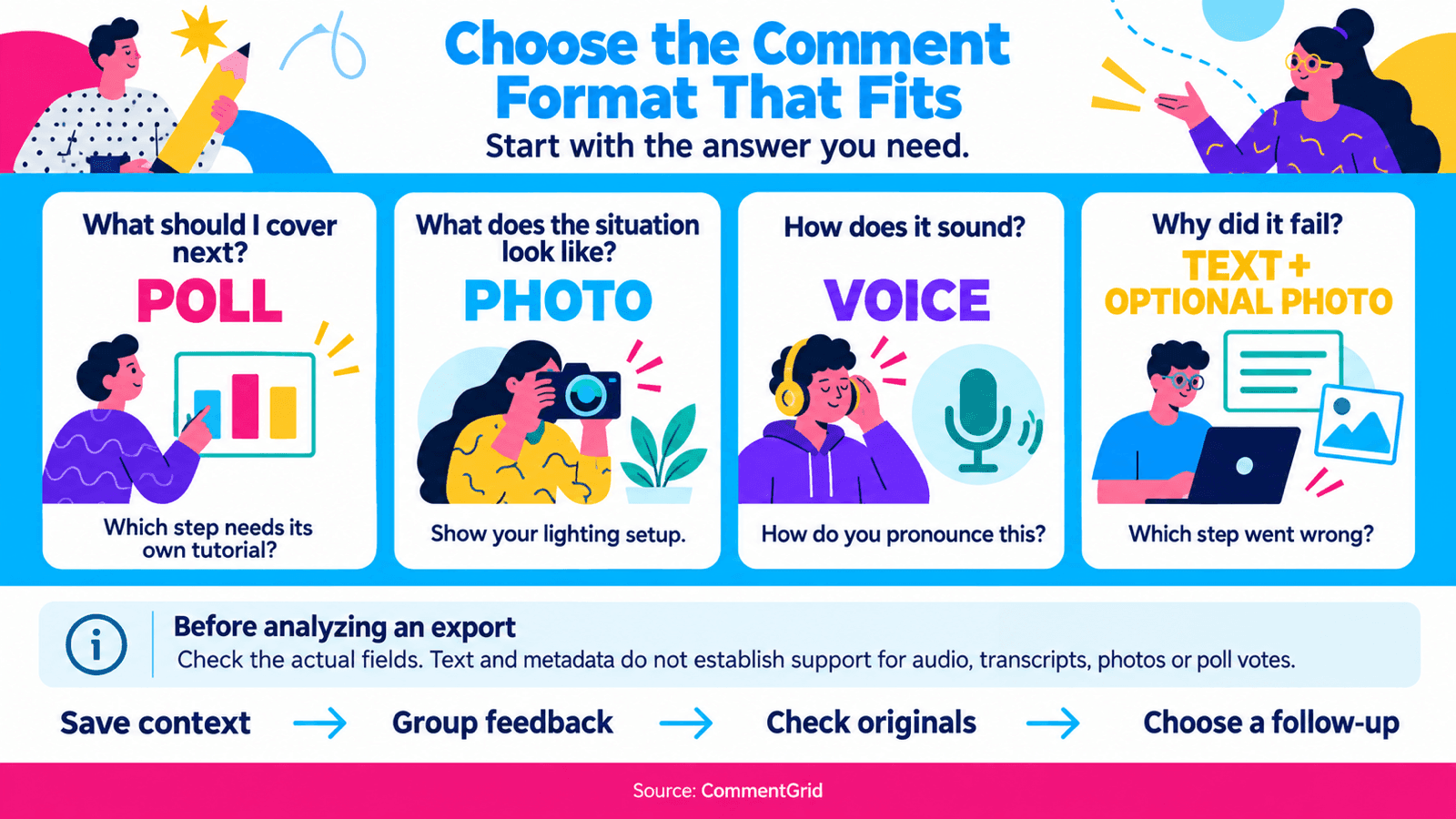
The same principle can guide how you use the update. Start with the answer you need, then choose the format that makes it easiest to provide.
| What you want to learn | Format to try | Example prompt |
|---|---|---|
| What viewers want you to cover next | Poll | "Which step needs its own tutorial?" |
| What a viewer's situation looks like | Photo comment | "Show your lighting setup and tell me what you want to improve." |
| How something sounds | Voice comment | "How do you pronounce this where you live?" |
| Why something failed | Text, with a photo if useful | "Which step went wrong, and what did you try?" |
These are suggested experiments, not claims about TikTok's recommendation system. None of the reviewed announcements establishes an automatic ranking bonus for using a new comment format.
Turn TikTok comments into your next content decision
Try one format on a small group of comparable posts. Keep the topic, response window and audience context as consistent as practical, then review whether the replies helped you make a decision.
Look beyond the total comment count. Record how many useful questions you received, which problems recur, whether more distinct viewers contributed, and how much time the conversation took to review. A shorter thread that reveals a missing tutorial may be more valuable than a long thread of unrelated recordings.
For a repeatable review, use these steps:
- Save the context. Record the video link, prompt and review date.
- Group the feedback. Separate questions, suggestions, experiences and off-topic reactions.
- Check the original. Revisit any photo or recording whose meaning is unclear from your notes.
- Choose a follow-up. Turn a recurring question into a video, clarification or product explanation.
If you need a spreadsheet of available public text comments, follow our TikTok comment export guide. Before analyzing a mixed-format thread, inspect the actual exported fields. The current guide describes text and metadata; it doesn't establish support for downloading voice recordings, transcribing them, saving photo attachments or collecting poll votes.
Keep those gaps visible in your notes. Otherwise, a text-only review could miss precisely the conversations the update encourages.
Frequently asked questions
Are TikTok voice comments the same as voice messages?
The feature covered here adds audio to a video's comment thread. Instructions for sending a message inside a private chat address a different task. Check which part of the app a tutorial is describing before following it.
Can I delete a TikTok comment I posted?
TikTok's general instructions are to open the comments, press and hold your comment, and choose Delete. TikTok Help Center
Does the Douyin rollout tell me when my TikTok account will get voice comments?
No. Use TikTok's own availability announcement for TikTok. Douyin's earlier experience helps explain the opportunities and tradeoffs of spoken replies, but it can't establish access for your account.
Can I analyze every new comment format in a CSV export?
A CSV only contains the fields the exporter retrieves. Check a sample against the original thread before treating it as a complete record. Keep a separate note of any audio, images or poll information that your workflow can't capture.
 M
MMarshall Sun
Building CommentGrid to decode social conversations. Exploring the signal within the noise of the global social web.