6 min read
To view TikTok comments, open a video and tap the Comments button beside it. For a public video you want to review in a table, paste its link into the CommentGrid TikTok comment viewer and exporter and select Start Export. Once results appear, read the returned rows or download them for further work.
The best method depends on whether you want to follow a conversation, find a particular comment, or keep a record.
| What You Want to Do | Best Starting Point |
|---|---|
| Read comments and reply in the conversation | The video's comment panel in TikTok |
| Review available text, authors, and engagement together | CommentGrid's returned comment table |
| Find a keyword or a specific author | A CSV export opened in Excel or Google Sheets |
| Save comments for research or reporting | A CSV or JSON download |
| Review filtered comments on a video you own | TikTok's comment-management settings |
How to View Comments in the TikTok App
- Open the video you want to read.
- Tap the speech-bubble Comments button beside the video.
- Read the comments shown in the panel.
- Open the replies beneath a comment when you want to follow that exchange.
TikTok documents the Comments button in its comment help guide. This is the simplest route when you want to read and respond in the same place.
How to View TikTok Comments on Desktop
Open the individual video's URL in your browser and use the video's comment panel. Follow any login or access prompt TikTok displays. A creator's profile page and an individual video page are different starting points; open the specific video before looking for its comments.
Use the original video when the visual content matters to the discussion. A comment such as “How did you do that?” may only make sense when you can see the moment it refers to.
Your browser's Ctrl + F or Command + F searches loaded page text. It does not fetch an entire comment thread. To find text within a saved set of comments, search the exported file instead.
How to Use CommentGrid as a TikTok Comment Viewer
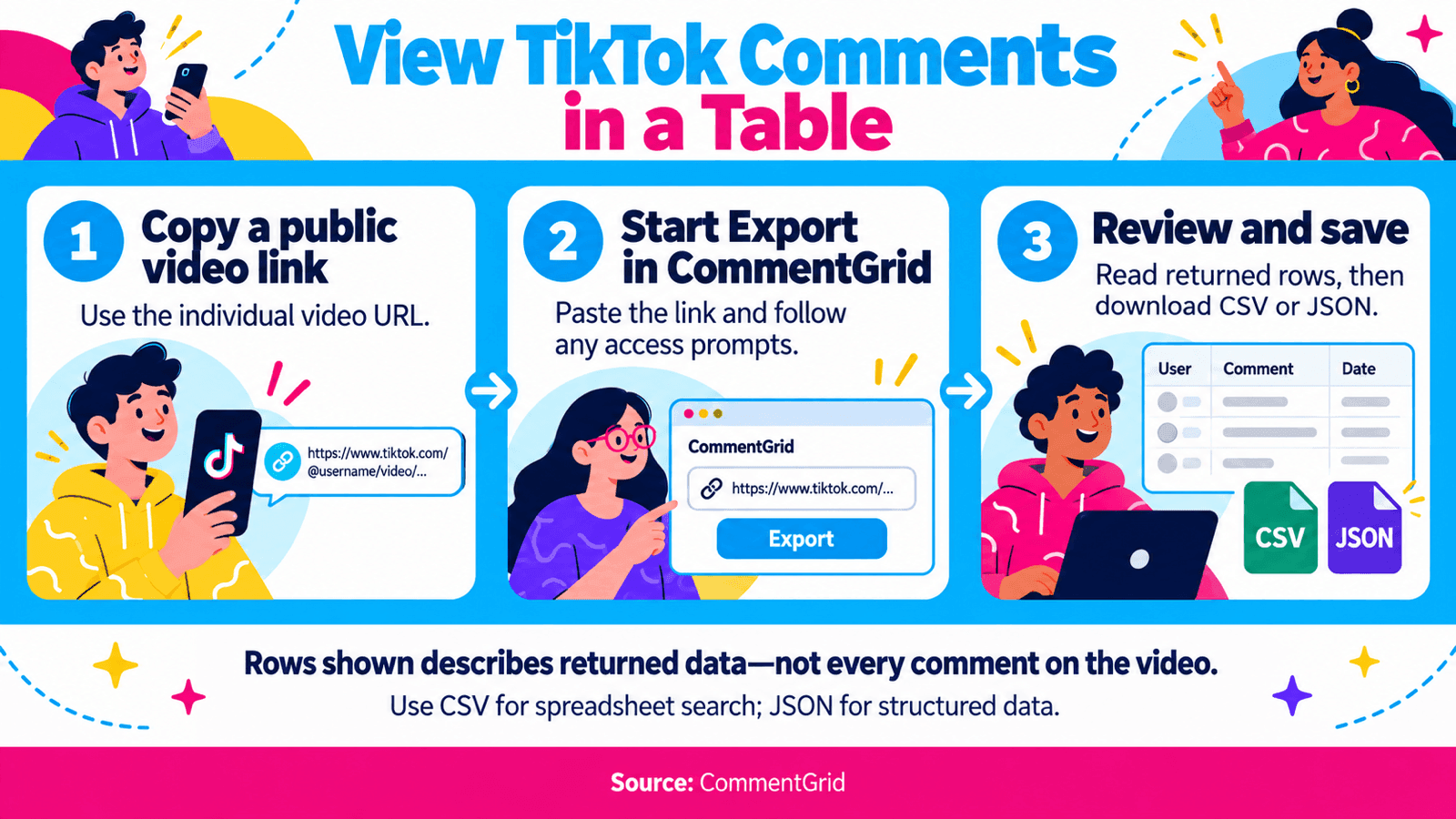
1. Copy the Public Video Link
Copy the link to the video you want to examine. On desktop, use the URL of the individual video page. In the app, use the video's sharing options to copy its link.
2. Paste It Into the TikTok Comment Tool
Open the TikTok Comment Downloader and Exporter, paste the URL into TikTok Video URL, and select Start Export.
The same tool handles viewing and downloading: you review returned rows before choosing whether to save them. If the page gives you an access message or asks you to continue with the CommentGrid extension, follow that next step.
3. Read the Returned Comment Table
After a successful request, the page displays Completed Successfully, a Rows shown count, and a table. In our walkthrough, the result contained these columns:
| Column | What to Read It For |
|---|---|
| Comment Text | What the person wrote |
| Comment Time | The time attached to the returned comment |
| Likes Count | Engagement recorded for that comment |
| Replies Count | The number of replies reported for its thread |
| Author Username | The account that wrote the comment |
| User Profile URL | The commenter's profile, when provided |
| Comment ID | The identifier for the comment record |
The Rows shown count describes the returned table. It is not a statement that you have retrieved every comment on the video.
Read the author and text together. A comment that mentions @sample_alex was not necessarily written by that account; use Author Username to identify the writer.
4. Keep Repeated Text When It Matters
The result includes Remove duplicate comments and Hide duplicate text options. These address different review needs. Separate people may post the same short reaction, so identical text can still represent distinct contributions.
For a review of how often people repeat a phrase, leave Hide duplicate text off. If you change a cleanup option, check the visible-row count before interpreting the results. Keep a copy of the original returned data for comparison.
5. Download a File for Search or Further Review
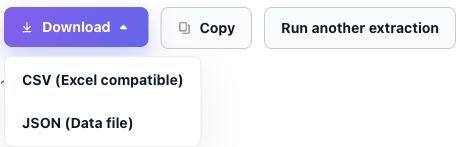
Open Download and choose CSV (Excel compatible) or JSON (Data file). Use CSV for Excel or Google Sheets; choose JSON for a structured-data workflow. The result also offers a Copy control.
For a longer walkthrough of saving files, see how to export TikTok comments.
Use a TikTok Comment Finder Workflow
If your goal is to find a particular comment, download CSV and open it in Excel or Google Sheets. Select the entire table, including its headers, before adding a filter so each comment stays attached to its other fields.
- Find a phrase: search or filter Comment Text for a distinctive word.
- Find a writer: filter Author Username for the exact username.
- Find a mention: search Comment Text for the handle that was mentioned.
Here is a fictional example using the observed column names:
| Author Username | Comment Text |
|---|---|
| sample_alex | Could you show the camera settings? |
| sample_maya | @sample_alex I want to know too. |
| sample_alex | Does this work on a phone? |
Filtering the author to sample_alex finds the first and third rows. Searching the text for @sample_alex finds the second row. That distinction makes the difference between finding someone's comments and finding comments about them.
For spreadsheet filter controls, use Microsoft's AutoFilter guide or Google Sheets' filtering guide. This workflow searches the exported video comments, rather than an account's activity across TikTok.
Understand Replies and Missing Comments
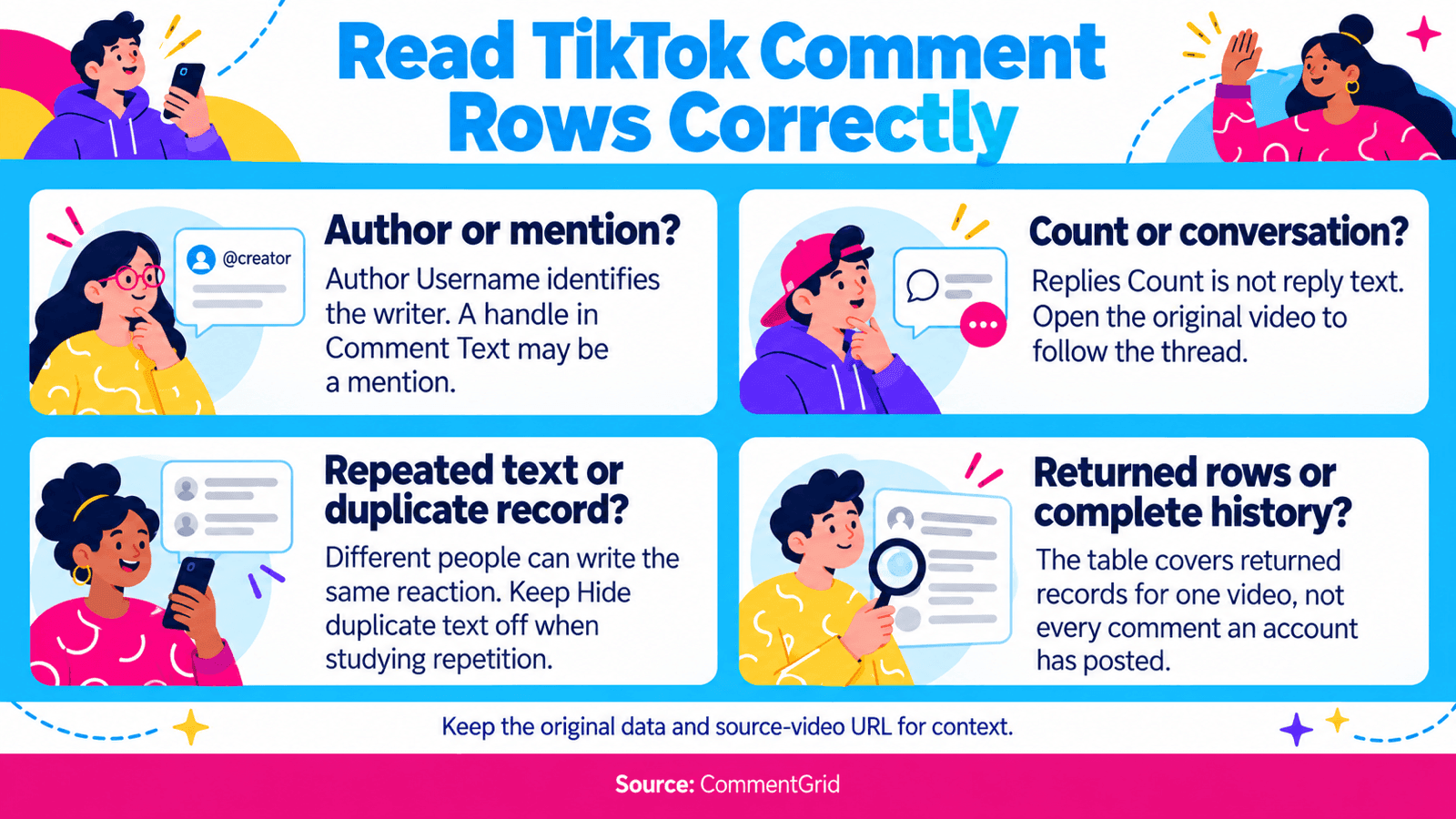
Replies Count is a count, not the reply conversation itself. In the table above, read it as an indication that a thread has replies. Open the original video to follow the available exchange. If another export workflow includes reply records, inspect those records and their relationship to the parent comment.
When comments are missing, check the original video first. Confirm that it is still accessible, open the comment panel, and expand the relevant thread. If you own the video, check its comment permissions and moderation settings. TikTok's comment-management guide explains how filtered comments are held for review.
A useful working file preserves what was returned and keeps the source-video URL alongside your notes. That makes a later review easier to compare with the original conversation.
Frequently Asked Questions
Can I View TikTok Comments Without Logging In?
Access varies by video and browsing session. Try the public video link and follow the prompts shown by TikTok or the tool. Signing into CommentGrid and signing into TikTok are separate actions; do not assume that one removes the other's access requirements.
Is a TikTok Comment Viewer the Same as a Downloader?
Viewing lets you read the returned data. Downloading saves a file you can use afterward. CommentGrid combines those steps in the existing TikTok comment tool, so you can inspect the result before choosing a download format.
Can I See the Most-Liked Comments?
Download the returned CSV, select the full table, and sort Likes Count from largest to smallest. This ranks the comments in your file. It does not establish the highest-liked comment among records that were not returned.
Can I See Someone's Full TikTok Comment History?
This workflow starts with a video URL. It can help you find an author within that video's exported comments. It does not retrieve all comments that account has made elsewhere on TikTok.
Does This Include TikTok LIVE Chat?
This guide covers comments under regular TikTok videos. LIVE chat is a separate conversation format and is outside this workflow.
What Should I Do After Reviewing the Comments?
Save questions worth answering, note repeated requests, or group feedback about the video. For a broader review of audience reactions, follow the Instagram and TikTok comment analysis guide.
View Comments From a Public TikTok Video
Paste a video link, review the returned comment rows, and download CSV or JSON when you want to search or work with the data.
Open TikTok Comment Viewer M
MMarshall Sun
Building CommentGrid to decode social conversations. Exploring the signal within the noise of the global social web.