9 min read
A TikTok comment scraper should match the collection job you actually have. Checking a few comments before a campaign report is different from collecting a list of videos every week or feeding comment records into an application.
Start with the workload: how many video URLs, whether you need reply text, and whether someone will run the tool manually. Then compare the setup, limits, and billing unit, including whether replies count toward the result limit.
This guide compares CommentGrid, Apify, Octoparse, and Thunderbit. If you have already chosen a tool and need the download steps, use our TikTok comment export guide.
Comparison scope: This is a CommentGrid guide based on official product documentation checked on October 24, 2026. It is not a speed, success-rate, or completeness benchmark. Plan details can change; check the linked product pages before starting a paid collection.
TikTok Comment Scrapers at a Glance
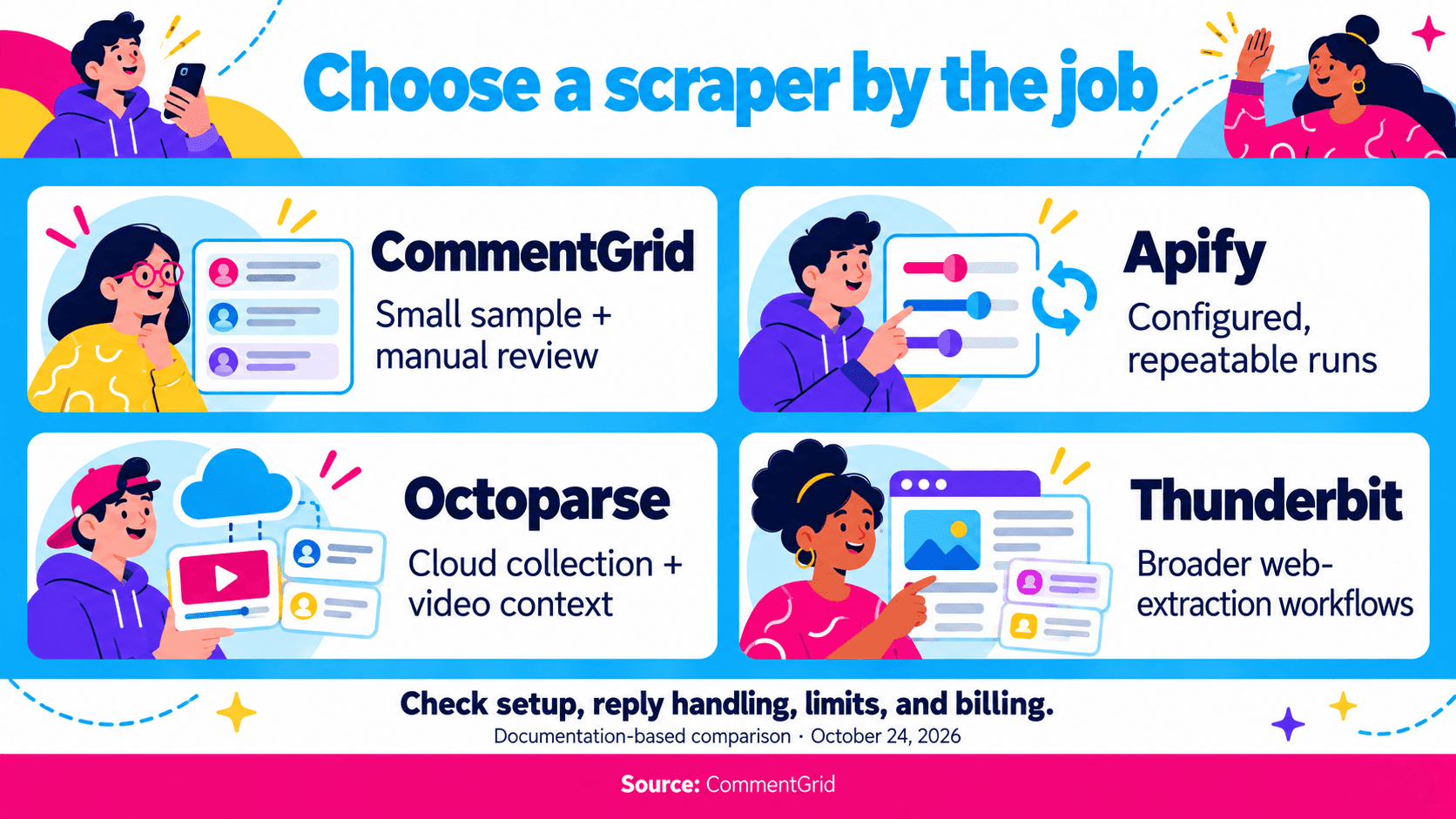
The table matches each documented workflow to a collection task.
| Tool | When to Consider It | Setup | Cost or Limit to Check |
|---|---|---|---|
| CommentGrid | Trying a small sample, then reviewing comments with a desktop extension | Web trial; Chrome installation for the extension | Web trial: up to 10 free comments per video. Extension credits and export limits are separate |
| Apify TikTok Comments Scraper | Configurable collection across a list of videos, with scheduling or API access | Apify account and Actor inputs | Per-result pricing; comments per post and replies per comment are configurable |
| Octoparse TikTok Video Details & Comments Scraper | A cloud template combining video details, comments, and replies | Octoparse account and template inputs | Plan access, output-line billing, and the combined comment/reply result limit |
| Thunderbit TikTok Comment Exporter | Evaluating a comment tool alongside a general web-extraction workflow | A web exporter page, with a Chrome extension also promoted | Free-tier availability is advertised; confirm the allowance for your chosen route |
CommentGrid: A Small Web Trial and a Desktop Extension
The CommentGrid TikTok comment tool lets you export up to 10 comments per video for free. It accepts a public video URL and offers CSV and JSON downloads without requiring an extension or your own API key.
That makes the web tool a place to inspect a small sample before installing. For larger exports, CommentGrid's Chrome extension supports TikTok comment workflows, including export, analysis, and giveaway selection. Review the returned data before using it for a report.
Check CommentGrid pricing for extension credits and per-export allowances. The 10-comment web trial is separate from those plans. A credit balance is also different from the maximum number of comments allowed in one export.
This route suits someone who wants to review comments manually. If your requirement is an unattended schedule, batch URL input, or a programmatic integration, verify those capabilities separately rather than inferring them from a CSV or JSON download.
Apify: Configurable Inputs for Repeated Collection
Apify's TikTok Comments Scraper, identified as clockworks/tiktok-comments-scraper, documents multiple video URLs or usernames as inputs. Its listing also describes API access, scheduling, and downloadable datasets.
The published input example separates commentsPerPost from maxRepliesPerComment. That distinction matters when you want to control both the size of each video's result and the depth of reply collection. Review the current input schema before a run; example values are not a promise that every requested record will be available.
Apify is worth considering when the input configuration needs to become part of a repeatable task. Keep that configuration alongside the results so a later run can use the same collection rules.
The pricing page advertises a starting rate per 1,000 comments. Check the applicable tier and how replies are charged before estimating a batch's cost.
Octoparse: A Cloud Template With Video Context
Octoparse's TikTok template combines video metadata, comments, and replies in a cloud workflow. Consider it when the surrounding video information is part of the deliverable, not just the comment text.
Its documented batch setting counts top-level comments and replies toward the same result limit. The stated pricing unit is output lines, so inspect how the export represents comments and replies before estimating costs.
Check template access for your plan and the supported run method. Then inspect the output's comment, reply, and status fields to decide whether the row structure fits your reporting system.
Thunderbit: A Comment Tool Within a Broader Scraping Product
Thunderbit's TikTok Comment Exporter describes a table containing an identifier, name, date, likes, and comment text. The page also promotes its Chrome extension, while the broader product covers general webpage extraction.
This is an option to evaluate if your work includes other kinds of webpages as well as TikTok comments. Confirm which route you will use: the exporter page, extension, or another service offered by the provider.
The page advertises a free tier, but that alone does not establish a TikTok-specific result cap, complete reply retrieval, or unlimited collection. Check those details against the selected workflow before treating it as a replacement for a dedicated comment collector.
Five Differences That Matter More Than a Feature Count
1. Video URLs Versus Profile or Search Inputs
For a fixed campaign, starting from known video URLs gives you a source list you can review. Profile-based discovery adds another decision: which videos the collector selects before it starts retrieving comments.
Save that selected video list. Otherwise, two runs may disagree because they covered different videos, even if the comment settings were identical.
If you need a video link, open the individual video on TikTok's desktop website and copy its address. In the iPhone or Android app, use Share → Copy link. See our social media post and video link guide for the device-specific instructions.
2. Reply Counts Versus Reply Text
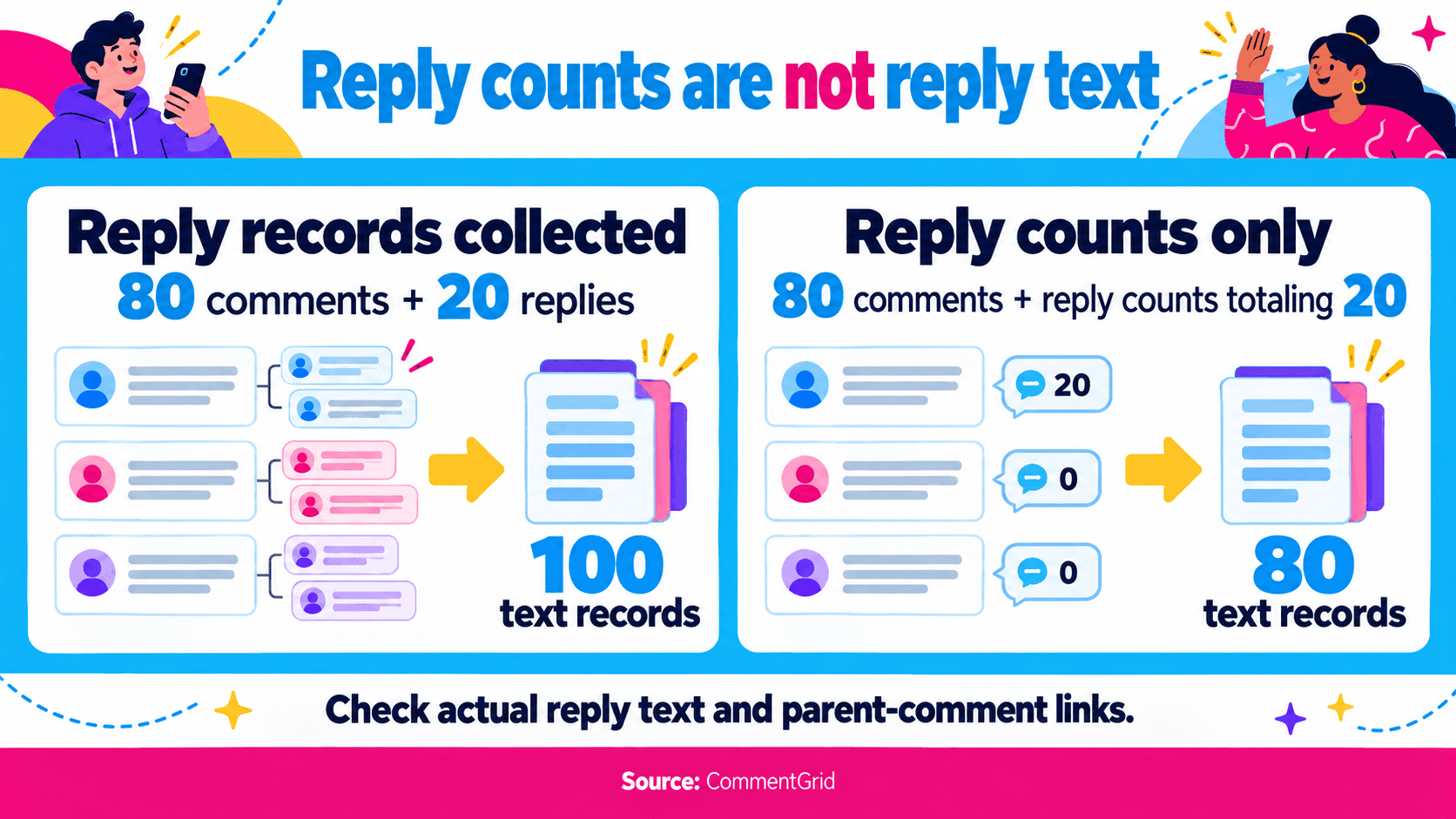
A reply-count field does not establish that reply records were collected. Ask whether the output includes actual reply text and a way to associate it with the parent comment.
Limits can also count replies differently. A setting for 100 results might cover 100 top-level comments, or a combined set of comments and replies. Check the tool's definition instead of assuming the number has the same meaning across providers.
For example, 80 top-level comment records plus 20 reply records make 100 records when the output stores one comment per row. A file with 80 comment texts and reply counts totaling 20 still contains only 80 comment texts.
3. A Manual Export Versus a Repeatable Job
An API or scheduler can reduce manual work, but the job still needs a defined input and a record of whether it finished.
For repeated collections, record the video list, limits, reply settings, collection time, and completion status. Decide how retries should behave before a failed run creates duplicate or overlapping datasets.
If someone will inspect a handful of videos occasionally, this setup may be unnecessary. A manual tool can be enough when the output is reviewed before use.
4. The Billing Unit Versus the Usable Dataset
Compare the cost of collecting the same videos with the same reply settings. A price per comment, a price per output line, and a credit pack measure different things until you understand the output model and plan rules.
Include any required plan or subscription in the comparison. Then ask whether a repeated run charges again for records you already collected and whether the downloaded dataset contains the fields you need.
A lower headline rate does not tell you the cost of a completed, usable collection.
5. Collection Limits Versus TikTok's Displayed Total
Keep three numbers separate: the total displayed on TikTok, the maximum you requested, and the records actually returned.
A lower result count can reflect a configured cap, missing replies, inaccessible comments, or a failed collection. Check the run settings and errors before deciding which explanation applies. No tool in this comparison has been independently verified here to retrieve every historical comment.
How to Compare Two Tools on Your Own Videos
Before paying for a large job, compare the tools on the same small set of public videos. Include a short comment section, a larger discussion, and at least one thread with visible replies.
Use matching limits and reply settings where possible. If a free trial caps the result at 10 comments, use it to check the available fields and basic workflow; it cannot establish how the product behaves on a full large-video export.
Keep a simple comparison record:
| Question | What to Inspect |
|---|---|
| Did it collect the intended videos? | Source URLs or video IDs |
| What counts as one result? | Comment rows, reply rows, or combined output |
| Can you distinguish records? | Comment IDs, video IDs, and parent relationships when available |
| Did the run finish? | Completion notice, limits, skipped URLs, or error messages |
| Can you use the text? | Emoji, line breaks, language, and timestamps in the downloaded file |
| What did the run cost? | Actual usage, required plan, and any reply-related charges |
Preserve the raw files before removing duplicates or changing fields. Keep long identifiers as text when importing them into a spreadsheet.
For a giveaway, use the rules in our TikTok winner-selection guide to decide how repeated commenters should count. For audience research, continue with analyzing Instagram and TikTok comments after checking the dataset's scope.
Which TikTok Comment Scraper Fits Your Task?
- You want direct exports, analysis, or giveaway selection: Try CommentGrid's web tool, or install the desktop extension for higher export limits.
- You need configured inputs and recurring or programmatic runs: Consider Apify and review its Actor inputs, reply settings, and pricing.
- You need video metadata alongside comments in a cloud template: Consider Octoparse and inspect its row model and combined result limit.
- You already use general webpage-extraction tools: Evaluate Thunderbit's TikTok route against the same comment and reply checks.
Make the choice after inspecting the output you will actually use. A documented feature is a useful reason to try a tool; the sample file shows whether that workflow fits your task.
Frequently Asked Questions
Is There a Free TikTok Comment Scraper?
Yes. Try CommentGrid's free web tool, or sign up to receive 300 free credits. The desktop Chrome extension provides higher export limits for larger collections. Other providers also offer trials or free tiers; compare the workflow that fits your task.
Which Tool Scrapes the Most TikTok Comments?
This comparison does not establish a winner for collection volume. Requested limits, accessible comments, reply settings, and failed runs can all affect the result. Compare completed runs on the same videos before making a volume claim.
Can I Use TikTok's Official API Instead?
TikTok documents a Research API comment endpoint. Access is subject to its Research Tools eligibility and approval requirements; it is not a general substitute that every commercial user can immediately enable. Confirm your project's eligibility before planning around it.
Can These Tools Retrieve Private or Deleted Comments?
Do not choose a public-video scraper on that assumption. Check the provider's supported access scope, and treat private, deleted, restricted, or otherwise inaccessible content as unavailable unless you have a supported, authorized way to access it.
Is a Comment Exporter Different From a Comment Scraper?
The names overlap. A scraper describes collecting the records; an exporter describes producing a downloadable file. Choose by the supported inputs, reply handling, and output rather than the name. Our TikTok export tutorial covers the file-download workflow.
Export More TikTok Comments With CommentGrid
Get higher export limits with CommentGrid in desktop Chrome. Sign up to receive 300 free credits.
Add CommentGrid to ChromePrefer to try it first? Try the Free TikTok Web Tool.
 M
MMarshall Sun
Building CommentGrid to decode social conversations. Exploring the signal within the noise of the global social web.